
I have another post about setting up the VMware HoloKit, but this post is about the HW needed.
The first test was a “lego-build”, a decommisioned Cisco server with memory from a Dell server, CPU`s from a Cisco blade, SSDdisks from another Cisco server, and so on, you get the picture. Eventually we had something that resembled a server with the minimum Holo prereq.
As the list below states, it`s important to have a supported cpu that works with the Cloudbuilder you are configuring. So make note of the cpu in your server, do a quick google search for: “CPU vmware hcl”, in my case : Intel e5-2620 v2 vmware hcl.
It will give you something like this:

From the list above, it`s quite easy to confirm that our cpu in the Cisco server is only supported up until esxi v.7, so that means we need to consider that when setting up Holodeck.
If you take a look at the release notes for VCF and cloudbuilder 5.0 which is the recommended version in Holokit 2.0, you see a section called “Bill of materials BOM”:

This shows us every bit of SW that’s included in 5.0. Because this says esxi 8.0 update 1a, we can not use that version, and need to consider Cloudbuilder 4.5.2.
Here the BOM looks like this:
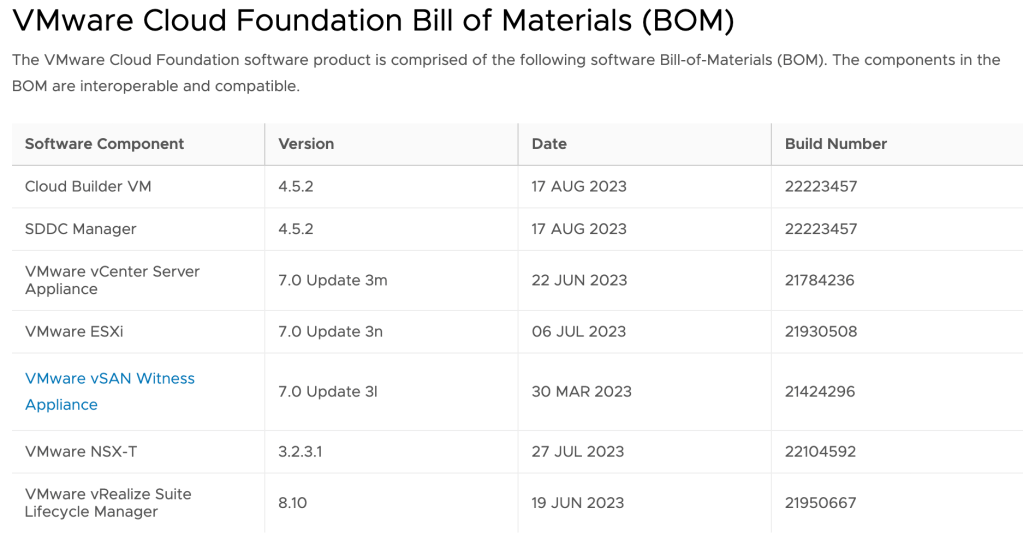
Here we have esxi version 7, so our cpu should be OK, but i can tell you, it`s a rocky road getting to the finish line with that version. So my tip before you start, verify your cpu, and try to get one certified for esxi8.
Yes , you can define: run unsupported mode(allowLegacyCPU=true) appending this setting during boot with “SHIFT+O” like William Lam has a post about, but when you during construct set up an NSX edge cluster, they will not start after deployment unless you configure the setting i mention below in your nested esxi server, trying to start the edge servers.
The esxi is actually a vm, so you need to add those 2 settings in adv. vmsettings. This is only for esxi7, unsupported CPU.
The Holodeck HW configurations:


(Sorry about the Dell picture, it was taken by a colleague, he is a Consultant, not a photographer, obviously 😜)
So after struggling uphill for a while, i decided to make a HW change, and reconfigured a decommisioned Dell R730XD vsan hybrid node.
I replaced the disk controller from passthrough to Raid, took half the cache disks in the hybrid node cluster, and setup a diskraid for Holodeck disk.
The CPU was Intel E5-2680 v4, meaning i had support for esxi v8, and was able to use the recommended Cloudbuilder in Holokit 2.0. This was completely different and the setup went smoothly the first time.
The lifecycle mangager and the Aria products are also tested with a specific version, so this also went smoothly on version 8, not so much on version 7.
My tip : go for version 8 with a supported CPU.
 Bervid.net
Leave a comment