
We talk about Tanzu, but what are the differences between a supervisor cluster and a TKG cluster?
In VMware’s Kubernetes ecosystem, a Supervisor Cluster and a Tanzu Kubernetes Grid (TKG) Cluster serve different but complementary roles. Here’s an overview of each and the key differences between them:
VMware Supervisor Cluster
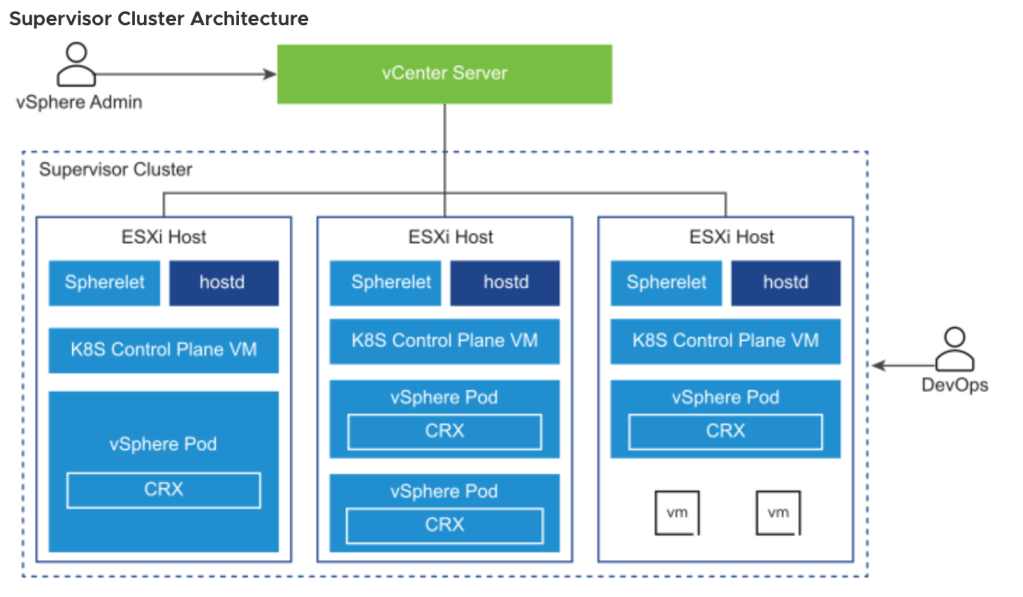
- Definition:
- A Supervisor Cluster is a Kubernetes cluster that runs directly on vSphere using ESXi as the worker nodes.
- It integrates Kubernetes natively with vSphere through vSphere with Tanzu.
- Architecture:
- Runs natively on ESXi, with each ESXi host serving as a Kubernetes worker node.
- Uses vSphere Distributed Switch (vDS) and NSX-T for networking.
- Incorporates VMware vSphere Pod Service, allowing native Kubernetes Pods to run alongside VMs.
- Features:
- vSphere Pods: Lightweight pods that run directly on ESXi, providing isolation and security similar to VMs.
- Namespaces: Provide logical and security boundaries for resources within a vSphere environment.
- Integrated Management: Manage through vCenter, leveraging vSphere roles and permissions.
- Use Case:
- Ideal for Kubernetes workloads that need direct integration with vSphere, particularly for users who want a tightly integrated Kubernetes solution within their existing VMware environment.
Tanzu Kubernetes Grid (TKG) Cluster
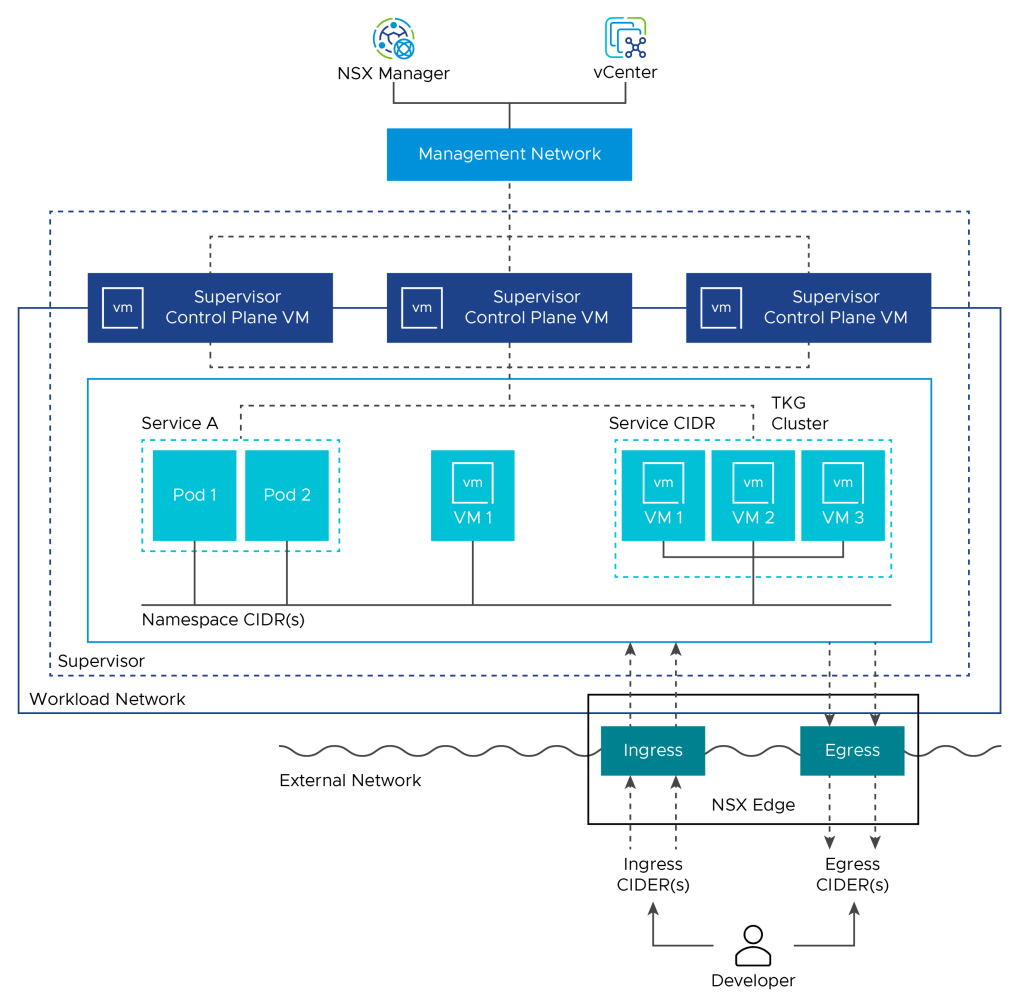
- Definition:
- TKG clusters are Kubernetes clusters managed and deployed by VMware Tanzu Kubernetes Grid.
- Can be deployed on multiple environments: vSphere, public clouds, and at the edge.
- Architecture:
- TKG clusters run on top of the Supervisor Cluster, but also support standalone deployments.
- Deploys and manages clusters via Cluster API and Kubernetes Operators.
- Features:
- Multi-Cloud Support: Deploys across multiple cloud platforms like AWS, Azure, and vSphere.
- Cluster API: Automates lifecycle management (creation, scaling, upgrade, and deletion) using Kubernetes-style declarative APIs.
- Compatible: Works with standard Kubernetes tooling.
- Use Case:
- Best for organizations seeking consistent Kubernetes deployments across hybrid environments (e.g., on-premises and public cloud).
Key Differences
- Deployment Model:
- Supervisor Cluster: Kubernetes control plane runs directly on ESXi hosts.
- TKG Cluster: Kubernetes clusters deployed on top of the Supervisor Cluster or on other platforms.
- Network Integration:
- Supervisor Cluster: Integrates deeply with NSX-T and vDS for networking and security.
- TKG Cluster: Uses Calico for networking (NSX-T available for vSphere deployments).
- Management Interface:
- Supervisor Cluster: Managed via vCenter.
- TKG Cluster: Managed via kubectl, Tanzu CLI, or through vCenter if deployed on a Supervisor Cluster.
- Workload Types:
- Supervisor Cluster: Supports vSphere Pods and Tanzu Kubernetes Clusters.
- TKG Cluster: Standard Kubernetes clusters for portable workloads.
Summary
- Supervisor Cluster provides native integration with vSphere and enables Kubernetes workloads to run directly on ESXi.
- TKG Cluster offers consistent Kubernetes clusters across multiple environments.
TANZU Network choices:
So there is a network difference. This could be important in our design.
What separates the different network options:
Networking Solutions in TKG Clusters
- Calico:
- Default Network Provider: In most TKG clusters, Calico is used as the default Container Network Interface (CNI).
- Features:
- Network Policy: Implements Kubernetes NetworkPolicy for fine-grained traffic control.
- IP Address Management: Manages pod IP addresses dynamically.
- Overlay Networking: Uses VXLAN or IP-in-IP encapsulation.
- Antrea:
- Alternative Network Provider: In certain TKG clusters, Antrea is available as an alternative CNI.
- Features:
- Open vSwitch (OVS) based networking.
- Implements Kubernetes NetworkPolicy.
- NSX-T Integration:
- Available for vSphere Deployments:
- When TKG clusters are deployed on vSphere with Tanzu (within Supervisor Clusters), NSX-T can be used as the network provider.
- Features:
- Networking and Security Policies: Provides centralized network security policies via NSX-T.
- Load Balancer: Offers built-in load balancing.
- Networking: Supports Tier-0 and Tier-1 routing.
- Available for vSphere Deployments:
Choosing a Networking Solution
- Calico:
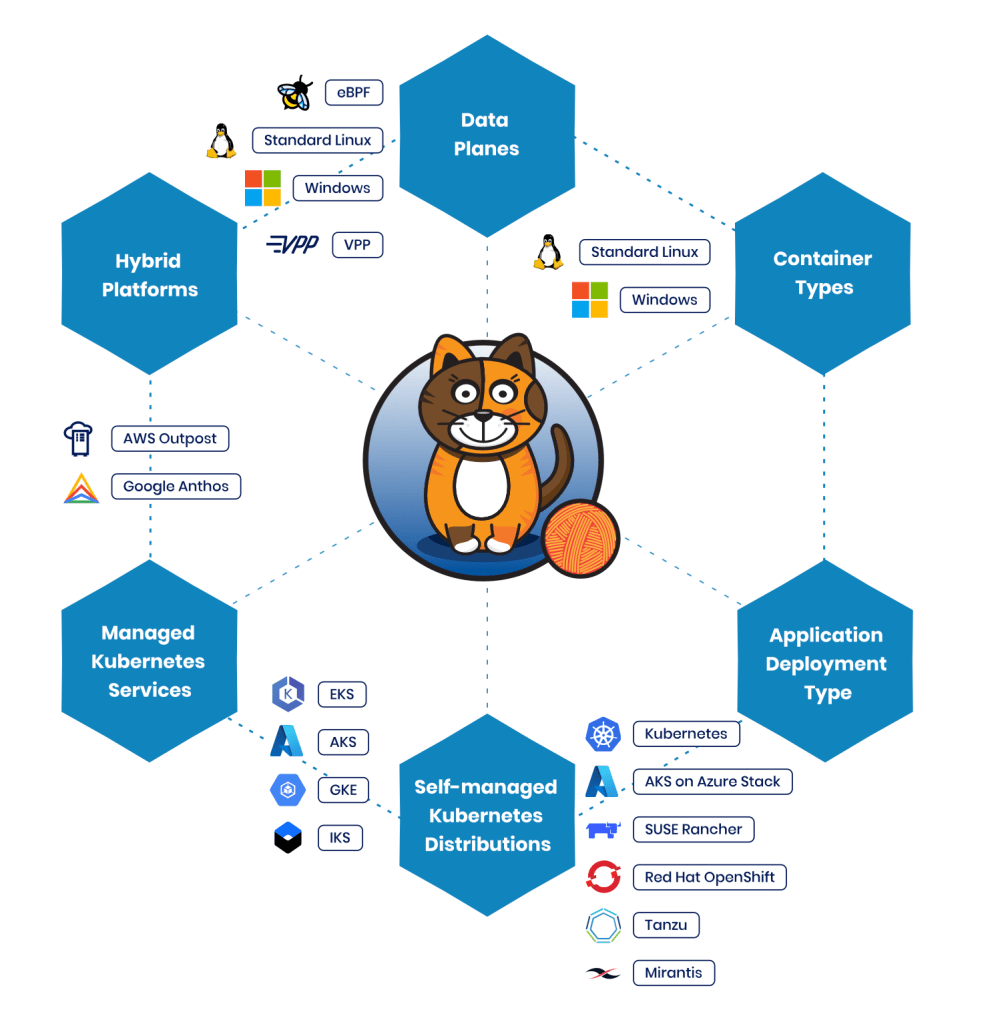
- Best suited for environments needing a simple and effective CNI solution.
- Supports a broad range of TKG deployments.
- Antrea:
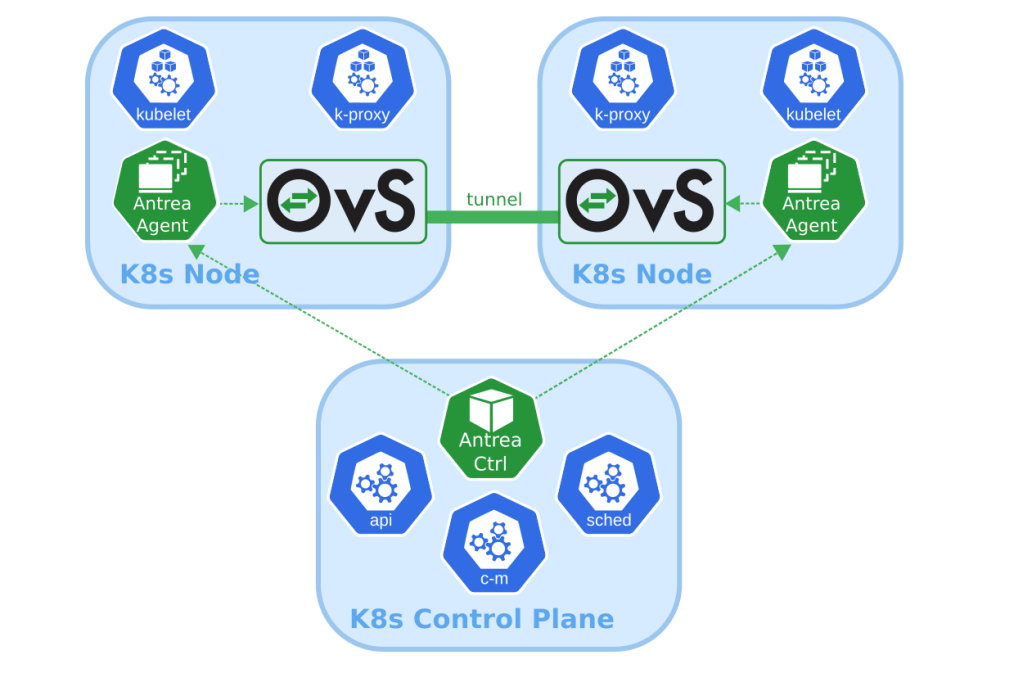
- Suitable for users looking for an OVS-based solution.
- Provides efficient networking in TKG clusters.
- NSX-T:
- Ideal for environments requiring enterprise-grade networking and security.
- Deep integration with vSphere and enhanced capabilities.
Clarified Overview
- Supervisor Cluster (NSX-T or vDS):
- NSX-T and vDS are used to provide networking.
- Supervisor Cluster networks the TKG clusters deployed on top of it.
- TKG Cluster:
- Default CNI: Uses Calico or Antrea by default.
- NSX-T Integration: Available only for TKG clusters on vSphere.
Summary of Changes
- Clarification:
- NSX-T is not directly available in standalone TKG deployments but requires vSphere Supervisor Clusters.
So why would we have several TKG clusters in a single supervisor cluster?
1. Multi-Tenancy
- Isolated Environments: Each TKG cluster can be allocated to different teams, departments, or tenants, ensuring that their resources, configurations, and security policies are isolated.
- Access Control: Kubernetes RBAC can be applied independently within each TKG cluster, simplifying access management.
2. Workload Segmentation
- Application Isolation: Different applications or microservices can be deployed in separate TKG clusters to minimize resource competition and security risks.
- Environment Segregation:
- Dev/Test/Prod Environments: Keep development, testing, and production workloads separate to avoid cross-environment issues.
- Compliance: Ensure compliance by separating applications that require different security policies or standards.
3. Resource Management
- Scalability:
- Allows better resource allocation as each TKG cluster can scale independently.
- Enables efficient use of cluster resources based on workload needs.
- Resource Quotas:
- Each TKG cluster can be configured with quotas for CPU, memory, storage, etc.
- Prevents one team or tenant from monopolizing resources.
4. Application Modernization
- Legacy and Modern Applications:
- Legacy applications requiring more control can be hosted in dedicated TKG clusters.
- Modern, cloud-native applications can be placed in separate clusters with different networking or security requirements.
5. Networking Customization
- Network Policies:
- Different clusters can implement network policies using Calico or Antrea tailored to their specific requirements.
- NSX-T Integration:
- NSX-T policies can provide centralized networking and security policies for each TKG cluster.
6. Disaster Recovery and High Availability
- Fault Isolation:
- Multiple TKG clusters within the Supervisor Cluster minimize the impact of a single cluster failure.
- Backup and Restore:
- Backup strategies can be specific to individual TKG clusters.
7. Lifecycle Management
- Rolling Updates:
- Simplifies rolling updates since each TKG cluster can be updated independently.
- Cluster API (CAPI):
- Cluster API facilitates efficient lifecycle management of multiple TKG clusters.
Summary
Deploying multiple TKG clusters within a single Supervisor Cluster provides flexibility, isolation, resource management, and scalability. Organizations can structure their Kubernetes environments according to business needs and application requirements while maintaining security and operational efficiency.
 Bervid.net
Leave a comment