
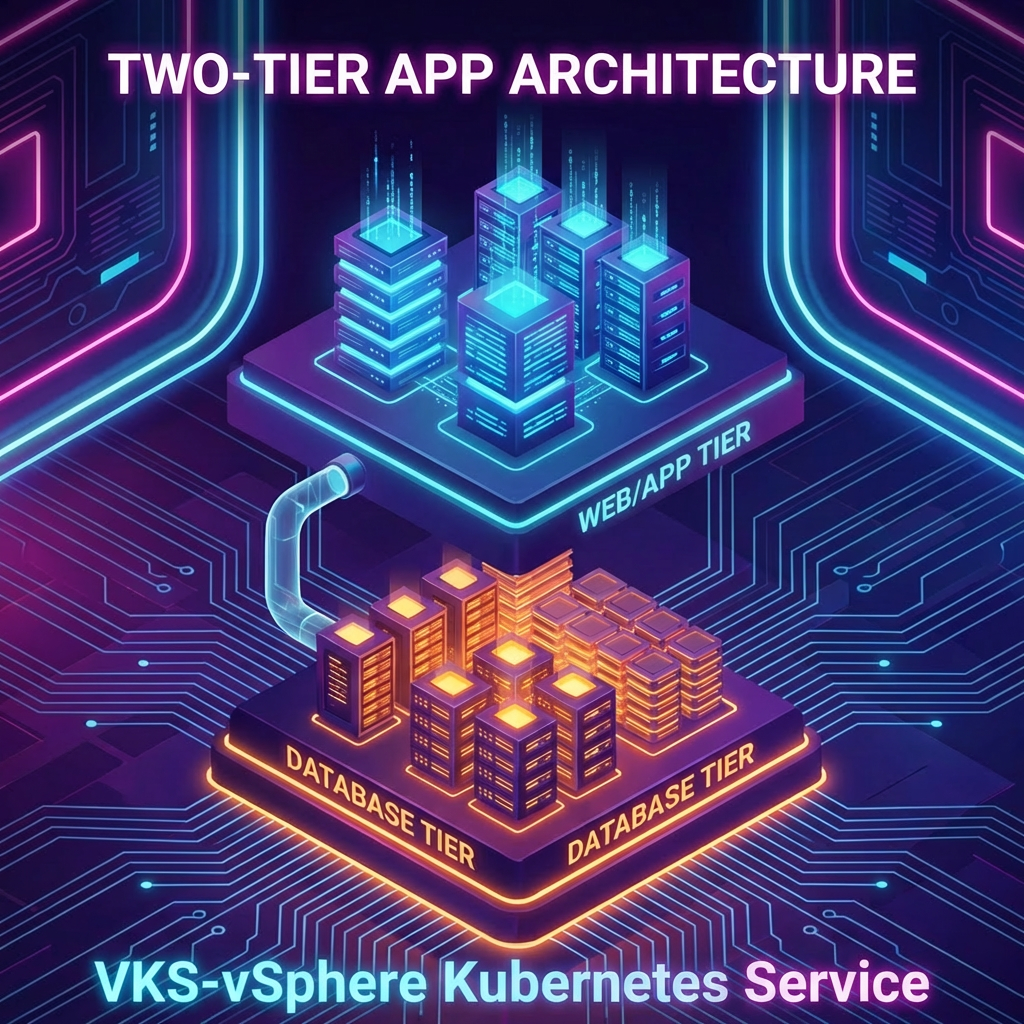
Deploy a simple two-tier application
In the last post we prepared VKS, and we are now ready to try some more useful applications.
Lets start with a two-tier application with a web frontend and a db.
First i check if i have a suitable namespace to deploy to.I dont`t, so i create a new one called demoapp.
kubectl --context vcflab02:svc-tkg-domain-c10 create ns demoapp
Next is the Harbor Pull-Secret:
kubectl --context vcflab02:svc-tkg-domain-c10 -n demoapp create secret docker-registry harbor-tkg-pull \--docker-server=harbor.vcf.local \--docker-username='robot$tkg+tkg-pull' \--docker-password='YOUR_PASSWORD' \--docker-email='unused@local'
fill in your own user info that you created previous in Harbor and verify that your robot account can do both push and pull.
Then patch your default service account:
kubectl --context vcflab02:svc-tkg-domain-c10 -n demoapp patch serviceaccount default \ --type=merge -p '{"imagePullSecrets":[{"name":"harbor-tkg-pull"}]}'
and verify:
kubectl --context vcflab02:svc-tkg-domain-c10 -n demoapp get secretkubectl --context vcflab02:svc-tkg-domain-c10 -n demoapp get sa default -o yaml
Now we are ready to run our script demoapp.sh
- deploy database
- create internal DB service
- initialize sample data
- deploy web app
- create LoadBalancer service for web app
- wait for LB IP
- create DNS record
- testing in browser
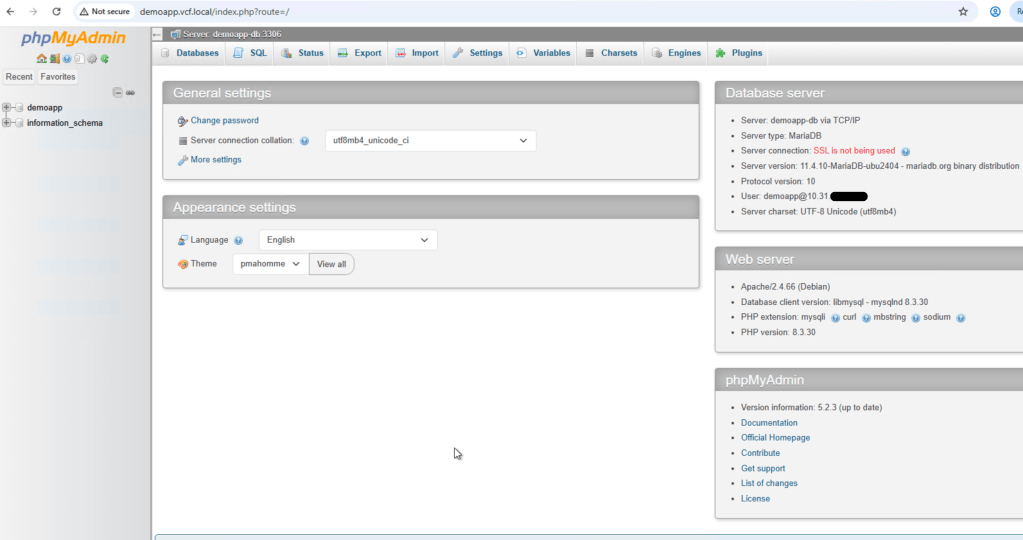
With Harbor access and image pull already working, the next step is to deploy a more realistic application. In this example, I use a simple two-tier setup with phpMyAdmin as the web frontend and MariaDB as the backend database. The web tier is exposed through its own Kubernetes LoadBalancer service and external IP, while the database remains internal only through a ClusterIP service.
This is a useful pattern because it reflects how many real applications are structured: the frontend is published externally, while the database is kept private inside the cluster. At the end of the script, the assigned LoadBalancer IP is printed so a DNS record such as demoapp.vcf.local can be created afterwards.
- uses the base context vcflab02 instead of expecting vcflab02:demoapp
- deploys to a dedicated namespace, for example demoapp
- uses an FQDN, for example demoapp.vcf.local
- waits for an assigned LoadBalancer IP
- prints the DNS record you need to create at the end
#!/usr/bin/env bashset -Eeuo pipefailsource /root/bootstrap/00-config.shlog(){ echo "[INFO] $*"; }warn(){ echo "[WARN] $*" >&2; }die(){ echo "[ERROR] $*" >&2; exit 1; }[[ "${EUID}" -eq 0 ]] || die "Run as root."command -v kubectl >/dev/null 2>&1 || die "kubectl not found. Run 02-base-tools.sh first."command -v docker >/dev/null 2>&1 || die "docker not found. Docker is required for image mirroring."# Force base context for this environmentVCF_CONTEXT_NAME="${VCF_CONTEXT_NAME:-vcflab03}"# Demo app settingsDEMO_NAME="${DEMO_NAME:-demoapp}"DEMO_NAMESPACE="${DEMO_NAMESPACE:-demoapp}"DEMO_FQDN="${DEMO_FQDN:-demoapp.vcf.local}"# Upstream imagesUPSTREAM_DB_IMAGE="${UPSTREAM_DB_IMAGE:-mariadb:11.4}"UPSTREAM_WEB_IMAGE="${UPSTREAM_WEB_IMAGE:-phpmyadmin:5-apache}"# Images in HarborDEMO_DB_IMAGE="${DEMO_DB_IMAGE:-${HARBOR_FQDN}/${HARBOR_PROJECT}/mariadb:11.4}"DEMO_WEB_IMAGE="${DEMO_WEB_IMAGE:-${HARBOR_FQDN}/${HARBOR_PROJECT}/phpmyadmin:5-apache}"# Database settingsDEMO_DB_NAME="${DEMO_DB_NAME:-demoapp}"DEMO_DB_USER="${DEMO_DB_USER:-demoapp}"DEMO_DB_PASSWORD="${DEMO_DB_PASSWORD:-ChangeMe123!}"DEMO_DB_ROOT_PASSWORD="${DEMO_DB_ROOT_PASSWORD:-ChangeRoot123!}"# StorageDEMO_DB_STORAGE_SIZE="${DEMO_DB_STORAGE_SIZE:-2Gi}"DEMO_STORAGE_CLASS="${DEMO_STORAGE_CLASS:-management-storage-policy-thin}"# Optional static LB IP. Leave empty for auto-assignment.DEMO_LB_IP="${DEMO_LB_IP:-}"# Auto mirror required images into HarborAUTO_PUSH_IMAGES="${AUTO_PUSH_IMAGES:-true}"# Use base supervisor contextctx="${VCF_CONTEXT_NAME}"ensure_namespace_exists() { kubectl --context "$ctx" get ns "$DEMO_NAMESPACE" >/dev/null 2>&1 \ || die "Namespace ${DEMO_NAMESPACE} not found. Create it first."}show_input_values() { log "Using values:" echo " VCF_CONTEXT_NAME = ${VCF_CONTEXT_NAME}" echo " DEMO_NAME = ${DEMO_NAME}" echo " DEMO_NAMESPACE = ${DEMO_NAMESPACE}" echo " DEMO_FQDN = ${DEMO_FQDN}" echo " UPSTREAM_DB_IMAGE = ${UPSTREAM_DB_IMAGE}" echo " UPSTREAM_WEB_IMAGE = ${UPSTREAM_WEB_IMAGE}" echo " DEMO_DB_IMAGE = ${DEMO_DB_IMAGE}" echo " DEMO_WEB_IMAGE = ${DEMO_WEB_IMAGE}" echo " DEMO_DB_NAME = ${DEMO_DB_NAME}" echo " DEMO_DB_USER = ${DEMO_DB_USER}" echo " DEMO_DB_STORAGE_SIZE = ${DEMO_DB_STORAGE_SIZE}" echo " DEMO_STORAGE_CLASS = ${DEMO_STORAGE_CLASS}" echo " AUTO_PUSH_IMAGES = ${AUTO_PUSH_IMAGES}" if [[ -n "${DEMO_LB_IP}" ]]; then echo " DEMO_LB_IP = ${DEMO_LB_IP}" else echo " DEMO_LB_IP = <auto-assigned>" fi}docker_login_harbor() { log "Logging in to Harbor" echo "${HARBOR_ROBOT_PASSWORD}" | docker login "${HARBOR_FQDN}" -u "${HARBOR_ROBOT_USER}" --password-stdin >/dev/null}image_exists_in_harbor() { local image="$1" docker manifest inspect "${image}" >/dev/null 2>&1}mirror_image_to_harbor() { local upstream_image="$1" local harbor_image="$2" if image_exists_in_harbor "${harbor_image}"; then log "Image already exists in Harbor: ${harbor_image}" return 0 fi log "Image not found in Harbor, mirroring ${upstream_image} -> ${harbor_image}" docker pull "${upstream_image}" docker tag "${upstream_image}" "${harbor_image}" docker push "${harbor_image}"}ensure_demo_images() { if [[ "${AUTO_PUSH_IMAGES}" != "true" ]]; then log "AUTO_PUSH_IMAGES=false, skipping automatic image mirroring" return fi docker_login_harbor mirror_image_to_harbor "${UPSTREAM_DB_IMAGE}" "${DEMO_DB_IMAGE}" mirror_image_to_harbor "${UPSTREAM_WEB_IMAGE}" "${DEMO_WEB_IMAGE}"}deploy_demoapp() { log "Deploying ${DEMO_NAME} into namespace ${DEMO_NAMESPACE}" if [[ -n "${DEMO_LB_IP}" ]]; then cat <<YAML | kubectl --context "$ctx" -n "$DEMO_NAMESPACE" apply -f -apiVersion: v1kind: Secretmetadata: name: ${DEMO_NAME}-db-secrettype: OpaquestringData: MARIADB_ROOT_PASSWORD: "${DEMO_DB_ROOT_PASSWORD}" MARIADB_DATABASE: "${DEMO_DB_NAME}" MARIADB_USER: "${DEMO_DB_USER}" MARIADB_PASSWORD: "${DEMO_DB_PASSWORD}"---apiVersion: v1kind: ConfigMapmetadata: name: ${DEMO_NAME}-db-initdata: 01-init.sql: | CREATE TABLE IF NOT EXISTS demo_messages ( id INT AUTO_INCREMENT PRIMARY KEY, message VARCHAR(255) NOT NULL ); INSERT INTO demo_messages (message) VALUES ('Hello from VKS and MariaDB') ON DUPLICATE KEY UPDATE message=VALUES(message);---apiVersion: v1kind: PersistentVolumeClaimmetadata: name: ${DEMO_NAME}-db-pvcspec: accessModes: - ReadWriteOnce storageClassName: ${DEMO_STORAGE_CLASS} resources: requests: storage: ${DEMO_DB_STORAGE_SIZE}---apiVersion: apps/v1kind: Deploymentmetadata: name: ${DEMO_NAME}-dbspec: replicas: 1 selector: matchLabels: app: ${DEMO_NAME}-db template: metadata: labels: app: ${DEMO_NAME}-db spec: containers: - name: mariadb image: ${DEMO_DB_IMAGE} imagePullPolicy: Always ports: - containerPort: 3306 envFrom: - secretRef: name: ${DEMO_NAME}-db-secret volumeMounts: - name: db-data mountPath: /var/lib/mysql - name: db-init mountPath: /docker-entrypoint-initdb.d volumes: - name: db-data persistentVolumeClaim: claimName: ${DEMO_NAME}-db-pvc - name: db-init configMap: name: ${DEMO_NAME}-db-init---apiVersion: v1kind: Servicemetadata: name: ${DEMO_NAME}-dbspec: type: ClusterIP selector: app: ${DEMO_NAME}-db ports: - port: 3306 targetPort: 3306---apiVersion: apps/v1kind: Deploymentmetadata: name: ${DEMO_NAME}-webspec: replicas: 1 selector: matchLabels: app: ${DEMO_NAME}-web template: metadata: labels: app: ${DEMO_NAME}-web spec: containers: - name: phpmyadmin image: ${DEMO_WEB_IMAGE} imagePullPolicy: Always ports: - containerPort: 80 env: - name: PMA_HOST value: ${DEMO_NAME}-db - name: PMA_PORT value: "3306" - name: UPLOAD_LIMIT value: "64M"---apiVersion: v1kind: Servicemetadata: name: ${DEMO_NAME}-web-lbspec: type: LoadBalancer loadBalancerIP: ${DEMO_LB_IP} selector: app: ${DEMO_NAME}-web ports: - port: 80 targetPort: 80YAML else cat <<YAML | kubectl --context "$ctx" -n "$DEMO_NAMESPACE" apply -f -apiVersion: v1kind: Secretmetadata: name: ${DEMO_NAME}-db-secrettype: OpaquestringData: MARIADB_ROOT_PASSWORD: "${DEMO_DB_ROOT_PASSWORD}" MARIADB_DATABASE: "${DEMO_DB_NAME}" MARIADB_USER: "${DEMO_DB_USER}" MARIADB_PASSWORD: "${DEMO_DB_PASSWORD}"---apiVersion: v1kind: ConfigMapmetadata: name: ${DEMO_NAME}-db-initdata: 01-init.sql: | CREATE TABLE IF NOT EXISTS demo_messages ( id INT AUTO_INCREMENT PRIMARY KEY, message VARCHAR(255) NOT NULL ); INSERT INTO demo_messages (message) VALUES ('Hello from VKS and MariaDB') ON DUPLICATE KEY UPDATE message=VALUES(message);---apiVersion: v1kind: PersistentVolumeClaimmetadata: name: ${DEMO_NAME}-db-pvcspec: accessModes: - ReadWriteOnce storageClassName: ${DEMO_STORAGE_CLASS} resources: requests: storage: ${DEMO_DB_STORAGE_SIZE}---apiVersion: apps/v1kind: Deploymentmetadata: name: ${DEMO_NAME}-dbspec: replicas: 1 selector: matchLabels: app: ${DEMO_NAME}-db template: metadata: labels: app: ${DEMO_NAME}-db spec: containers: - name: mariadb image: ${DEMO_DB_IMAGE} imagePullPolicy: Always ports: - containerPort: 3306 envFrom: - secretRef: name: ${DEMO_NAME}-db-secret volumeMounts: - name: db-data mountPath: /var/lib/mysql - name: db-init mountPath: /docker-entrypoint-initdb.d volumes: - name: db-data persistentVolumeClaim: claimName: ${DEMO_NAME}-db-pvc - name: db-init configMap: name: ${DEMO_NAME}-db-init---apiVersion: v1kind: Servicemetadata: name: ${DEMO_NAME}-dbspec: type: ClusterIP selector: app: ${DEMO_NAME}-db ports: - port: 3306 targetPort: 3306---apiVersion: apps/v1kind: Deploymentmetadata: name: ${DEMO_NAME}-webspec: replicas: 1 selector: matchLabels: app: ${DEMO_NAME}-web template: metadata: labels: app: ${DEMO_NAME}-web spec: containers: - name: phpmyadmin image: ${DEMO_WEB_IMAGE} imagePullPolicy: Always ports: - containerPort: 80 env: - name: PMA_HOST value: ${DEMO_NAME}-db - name: PMA_PORT value: "3306" - name: UPLOAD_LIMIT value: "64M"---apiVersion: v1kind: Servicemetadata: name: ${DEMO_NAME}-web-lbspec: type: LoadBalancer selector: app: ${DEMO_NAME}-web ports: - port: 80 targetPort: 80YAML fi}wait_for_rollouts() { log "Waiting for database rollout" kubectl --context "$ctx" -n "$DEMO_NAMESPACE" rollout status deploy/"${DEMO_NAME}-db" --timeout=300s log "Waiting for web rollout" kubectl --context "$ctx" -n "$DEMO_NAMESPACE" rollout status deploy/"${DEMO_NAME}-web" --timeout=300s}get_demo_lb_ip() { kubectl --context "$ctx" -n "$DEMO_NAMESPACE" get svc "${DEMO_NAME}-web-lb" \ -o jsonpath='{.status.loadBalancer.ingress[0].ip}' 2>/dev/null || true}wait_for_demo_lb_ip() { log "Waiting for LoadBalancer IP for ${DEMO_NAME}-web-lb" local lb_ip="" local max_tries=36 local i for i in $(seq 1 "$max_tries"); do lb_ip="$(get_demo_lb_ip)" if [[ -n "${lb_ip}" ]]; then echo "${lb_ip}" return 0 fi sleep 5 done return 1}show_status() { log "Current objects" kubectl --context "$ctx" -n "$DEMO_NAMESPACE" get deploy,pod,svc,pvc | egrep "NAME|${DEMO_NAME}" || true}print_next_steps() { local lb_ip lb_ip="$(wait_for_demo_lb_ip || true)" echo echo "========================================" echo "Demo application deployment completed" echo "========================================" if [[ -n "${lb_ip}" ]]; then echo "Assigned LoadBalancer IP : ${lb_ip}" echo "Requested FQDN : ${DEMO_FQDN}" echo echo "Create this DNS record:" echo " ${DEMO_FQDN} -> ${lb_ip}" echo echo "Then open:" echo " http://${lb_ip}" echo " http://${DEMO_FQDN}" echo echo "phpMyAdmin login details:" echo " Server : ${DEMO_NAME}-db" echo " Username : ${DEMO_DB_USER}" echo " Password : ${DEMO_DB_PASSWORD}" echo echo "Demo database:" echo " Database : ${DEMO_DB_NAME}" echo " Table : demo_messages" else warn "No LoadBalancer IP assigned yet." echo echo "Check again with:" echo " kubectl --context \"$ctx\" -n \"$DEMO_NAMESPACE\" get svc ${DEMO_NAME}-web-lb -o wide" echo echo "Once the IP appears, create this DNS record:" echo " ${DEMO_FQDN} -> <assigned-lb-ip>" fi}main() { ensure_namespace_exists show_input_values ensure_demo_images deploy_demoapp wait_for_rollouts show_status print_next_steps log "08 done."}main "$@"
you may need to adjust to your specified storage class:
It`s defined in the script like this:
DEMO_STORAGE_CLASS=”${DEMO_STORAGE_CLASS:-management-storage-policy-thin}”
I used “management-storage-policy-thin”
If something fails, you should do a cleanup and run it again, use this:
kubectl --context vcflab02 -n demoapp delete deployment demoapp-db demoapp-web --ignore-not-foundkubectl --context vcflab02 -n demoapp delete service demoapp-db demoapp-web-lb --ignore-not-foundkubectl --context vcflab02 -n demoapp delete secret demoapp-db-secret --ignore-not-foundkubectl --context vcflab02 -n demoapp delete configmap demoapp-db-init --ignore-not-foundkubectl --context vcflab02 -n demoapp delete pvc demoapp-db-pvc --ignore-not-found
If you want to override fqdn or storage class, then run:
DEMO_NAMESPACE="demoapp" \DEMO_FQDN="demoapp.vcf.local" \DEMO_STORAGE_CLASS="management-storage-policy-thin" \./demoapp.sh
otherwise, just run: ./demoapp.sh
if all goes well, you should get something like this👇🏻 wich will give you the IP you need for the FQDN and the login details:
========================================
Demo application deployment completed
Assigned LoadBalancer IP : [INFO] Waiting for LoadBalancer IP for demoapp-web-lb
10.31.x.x
Requested FQDN : demoapp.vcf.local
Create this DNS record:
demoapp.vcf.local -> [INFO] Waiting for LoadBalancer IP for demoapp-web-lb
10.31.x.x
Then open:
http://%5BINFO%5D Waiting for LoadBalancer IP for demoapp-web-lb
10.31.x.x
http://demoapp.vcf.local
phpMyAdmin login details:
Server : demoapp-db
Username : demoapp
Password : ChangeMe123!
Demo database:
Database : demoapp
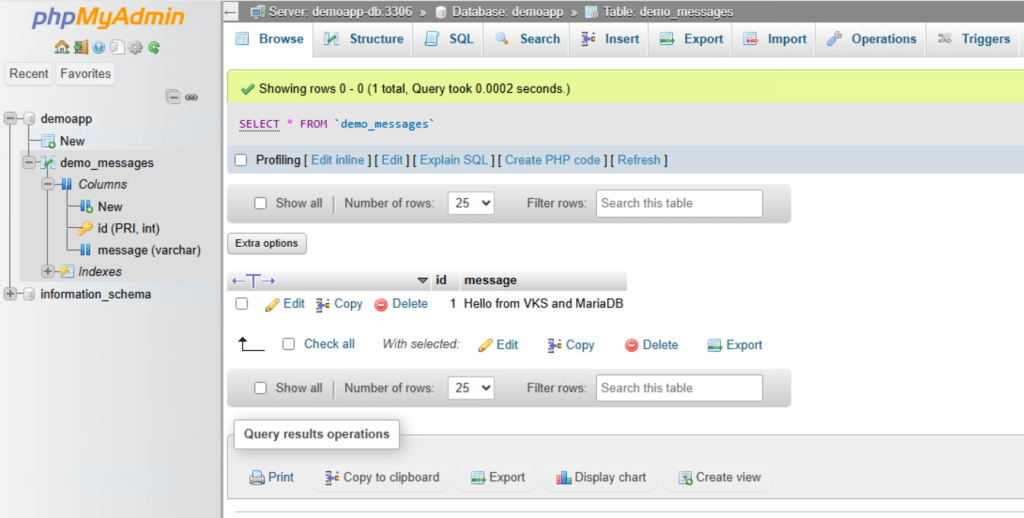
Table : demo_messages
[INFO] 08 done.
root@sv01-mgmt02 [ ~/bootstrap ]#
I add demoapp.vcf.local to my dns with the IP above.
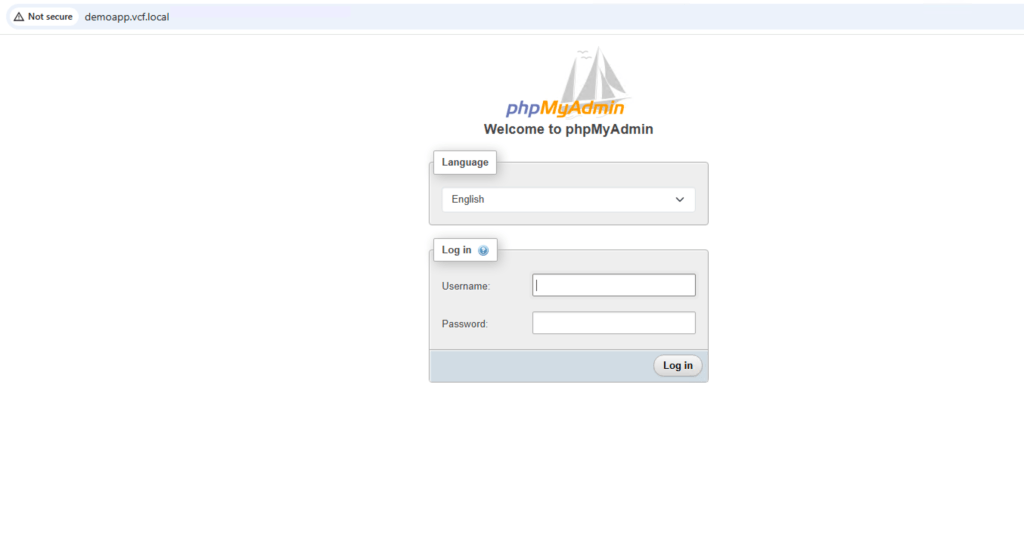
I use the login info and verify:
and the test message ” Hello from VKS and MariaDB”:
This is just an example, i hope you found it useful.
Many services that traditionally ran on dedicated Linux or Windows virtual machines can now be delivered as containerized applications on platforms such as Kubernetes. Instead of deploying one VM per service, organizations often run one containerized service per function, which makes deployment and lifecycle management more flexible.
The most common examples include web and ingress services such as NGINX, Apache, Envoy, and Traefik; container registries such as Harbor; CI/CD platforms such as GitLab and Argo CD; identity and access services such as Keycloak; secrets management with HashiCorp Vault; databases such as PostgreSQL, MariaDB/MySQL, MongoDB, and Redis; and observability stacks such as Prometheus and Grafana.
In practice, the best candidates for moving from VMs to containers are web applications, APIs, internal portals, monitoring tools, CI/CD platforms, identity services, message brokers, and many modern databases. Traditional Windows infrastructure, legacy applications, GUI-dependent software, and some highly specialized or licensed systems are more likely to remain on dedicated virtual machines.
A simple way to describe it is:
Many Linux-based infrastructure and application services can now be replaced by containerized platforms and applications, while Windows-based legacy and infrastructure workloads are often modernized more gradually.
Next post will be about configuring a two-tier application published from VCF Automation.
 Bervid.net
Leave a comment