
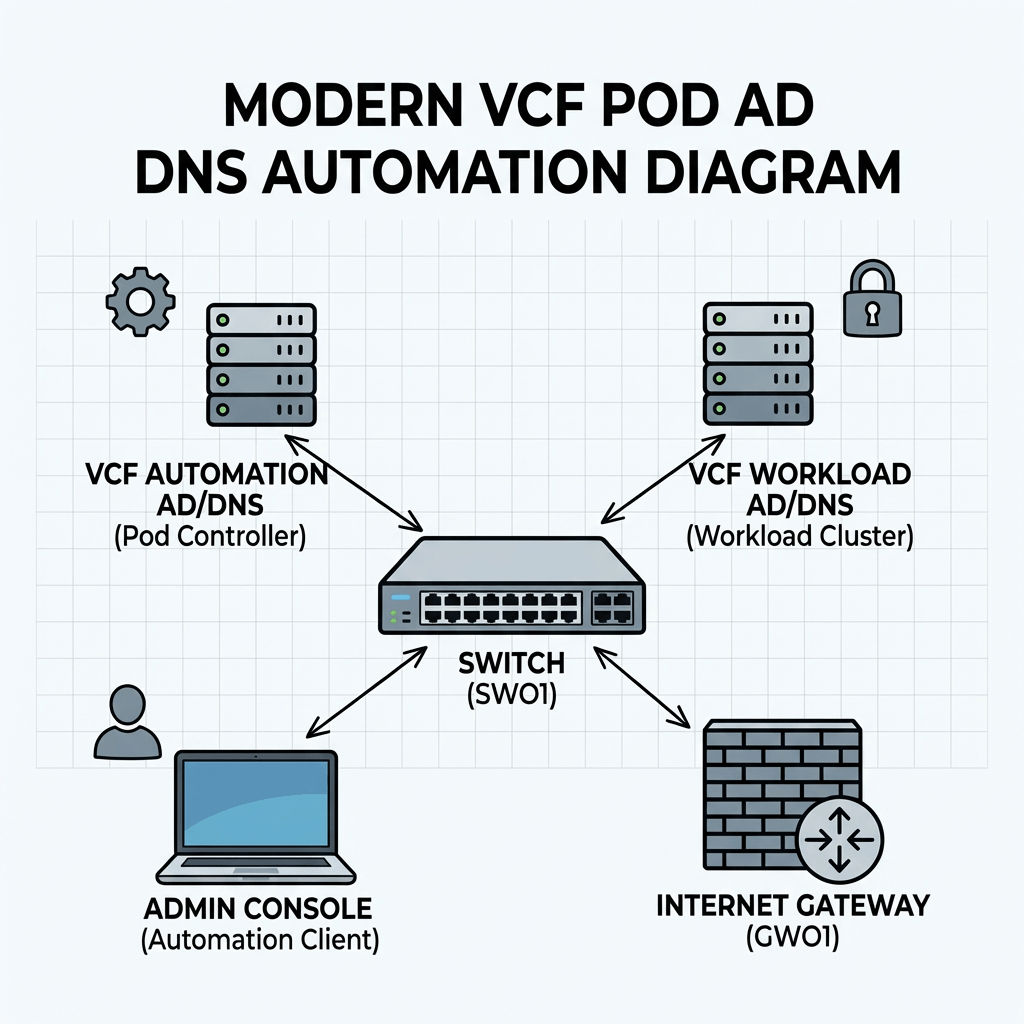
Objective: Creating a complete nested pod from scratch containing ad/dc/dns, tftp, ntp and a complete VCF installation.
- starting with automating the setup process in windows server in my new LAB.
- already configured an ipblock in my external fw based on /16, and created vlan and interface in the virtual fw for my mgmt network.
- already have a std windows 2022 server configured with static IP and a lokal admin.
Script functionality
The script automates the initial configuration of a Windows server that will function as an Active Directory domain controller and DNS server. It performs the following configuration steps:
- Configures the server hostname
- Verifies and disables Windows Defender Firewall
- Disables Internet Explorer Enhanced Security Configuration
- Enables Remote Desktop
- Sets the system timezone
- Configures time synchronization against a specified NTP source
- Installs the AD DS and DNS Server roles
- Creates a new Active Directory domain
- Creates an administrative account and adds it to the Domain Admins group
- Creates additional standard user accounts
- Creates a reverse DNS lookup zone for the target subnet
- Creates both forward (A) and reverse (PTR) DNS records for the domain controller
- Configures DNS forwarders
- Creates a baseline OU structure for administration and organization:
- Servers
- Users
- Service Accounts
Edit the configuration to fit your needs.
#requires -RunAsAdministrator<# Lab build script for the first AD/DNS server in pod 3 Stage 0: - Configure network - Disable firewall - Disable IE ESC - Enable RDP - Set time zone and NTP - Rename host if needed - Reboot immediately if rename was required Stage 1: - Install AD DS + DNS - Promote server to domain controller - Reboot Stage 2: - Create OU structure - Create users - Add domain admin membership - Configure reverse lookup zone - Ensure A/PTR record - Configure DNS forwarders - Run final validation#>param( [ValidateSet("Stage0","Stage1","Stage2")] [string]$Stage = "Stage0")$ErrorActionPreference = "Stop"# =========================# CONFIGURATION# =========================$ComputerName = "addc01"$DomainName = "bervid.local"$NetBIOSName = "BERVID"$ServerIPv4 = "xx.3.xx.10"$PrefixLength = 24$DefaultGateway = "xx.3.xx.1"$PreferredDNS = "127.0.0.1"$NtpServer = "ntp.uio.no"$ReverseNetworkId = "xx.3.xx.0/24"$ReverseZoneName = "xx.3.xx.in-addr.arpa"$DomainAdminUser = "administrator"$DefaultUserPwd = "VMware123!"$SafeModePassword = "VMware123!"$UsersToCreate = @("user1","user2","user3")$DnsForwarders = @("1.1.1.1","8.8.8.8")$ScriptPath = $MyInvocation.MyCommand.Path$TranscriptPath = "C:\Build-ADDS-Lab.log"$TaskStage1 = "Build-ADDS-Lab-Stage1"$TaskStage2 = "Build-ADDS-Lab-Stage2"Start-Transcript -Path $TranscriptPath -Append | Out-Null# Make sure the script runs in Windows PowerShell 5.1if ($PSVersionTable.PSEdition -ne 'Desktop') { throw "This script must be run in Windows PowerShell 5.1 (powershell.exe), not PowerShell 7 (pwsh)."}function Write-Step { param([string]$Message) Write-Host "" Write-Host "=== $Message ===" -ForegroundColor Cyan}function Get-BaseDN { $parts = $DomainName.Split(".") ($parts | ForEach-Object { "DC=$_" }) -join ","}function Register-StartupTask { param( [Parameter(Mandatory=$true)][string]$TaskName, [Parameter(Mandatory=$true)][string]$NextStage ) $action = New-ScheduledTaskAction -Execute "PowerShell.exe" -Argument "-ExecutionPolicy Bypass -File `"$ScriptPath`" -Stage $NextStage" $trigger = New-ScheduledTaskTrigger -AtStartup $principal = New-ScheduledTaskPrincipal -UserId "SYSTEM" -LogonType ServiceAccount -RunLevel Highest $task = New-ScheduledTask -Action $action -Trigger $trigger -Principal $principal Register-ScheduledTask -TaskName $TaskName -InputObject $task -Force | Out-Null}function Remove-StartupTask { param([string]$TaskName) Unregister-ScheduledTask -TaskName $TaskName -Confirm:$false -ErrorAction SilentlyContinue}function Ensure-StaticIP { Write-Step "Checking IPv4 configuration" $adapter = Get-NetAdapter | Where-Object Status -eq "Up" | Sort-Object ifIndex | Select-Object -First 1 if (-not $adapter) { throw "No active network adapter found." } Write-Host "Using adapter: $($adapter.Name)" $existing = Get-NetIPAddress -InterfaceIndex $adapter.ifIndex -AddressFamily IPv4 -ErrorAction SilentlyContinue | Where-Object { $_.IPAddress -ne "127.0.0.1" } if (-not $existing -or $existing.IPAddress -ne $ServerIPv4) { Write-Host "Setting static IP $ServerIPv4/$PrefixLength and gateway $DefaultGateway" $existing | ForEach-Object { try { Remove-NetIPAddress -InterfaceIndex $adapter.ifIndex -IPAddress $_.IPAddress -Confirm:$false -ErrorAction Stop } catch {} } Get-NetRoute -InterfaceIndex $adapter.ifIndex -DestinationPrefix "0.0.0.0/0" -ErrorAction SilentlyContinue | Remove-NetRoute -Confirm:$false -ErrorAction SilentlyContinue New-NetIPAddress -InterfaceIndex $adapter.ifIndex -IPAddress $ServerIPv4 -PrefixLength $PrefixLength -DefaultGateway $DefaultGateway | Out-Null } else { Write-Host "Static IPv4 is already set to $ServerIPv4" } Write-Host "Setting preferred DNS to $PreferredDNS" Set-DnsClientServerAddress -InterfaceIndex $adapter.ifIndex -ServerAddresses $PreferredDNS}function Disable-Firewall { Write-Step "Checking Windows Defender Firewall" $profiles = Get-NetFirewallProfile $enabledProfiles = $profiles | Where-Object Enabled -eq "True" if ($enabledProfiles) { Write-Host "Firewall is enabled on one or more profiles. Disabling it for lab usage." Set-NetFirewallProfile -Profile Domain,Private,Public -Enabled False } else { Write-Host "Firewall is already disabled on all profiles." } Get-NetFirewallProfile | Select-Object Name, Enabled | Format-Table -AutoSize}function Disable-IESecurity { Write-Step "Disabling IE Enhanced Security Configuration" $adminKey = "HKLM:\SOFTWARE\Microsoft\Active Setup\Installed Components\{A509B1A7-37EF-4B3F-8CFC-4F3A74704073}" $userKey = "HKLM:\SOFTWARE\Microsoft\Active Setup\Installed Components\{A509B1A8-37EF-4B3F-8CFC-4F3A74704073}" foreach ($key in @($adminKey, $userKey)) { if (Test-Path $key) { Set-ItemProperty -Path $key -Name "IsInstalled" -Value 0 -Type DWord } } Write-Host "IE ESC disabled. A logoff/logon may be required before the GUI reflects the change."}function Enable-RDP { Write-Step "Enabling Remote Desktop" Set-ItemProperty -Path "HKLM:\System\CurrentControlSet\Control\Terminal Server" -Name "fDenyTSConnections" -Value 0 Enable-NetFirewallRule -DisplayGroup "Remote Desktop" -ErrorAction SilentlyContinue | Out-Null Write-Host "Remote Desktop enabled."}function Set-TimeConfig { Write-Step "Configuring time zone and NTP" tzutil /s "W. Europe Standard Time" w32tm /config /manualpeerlist:$NtpServer /syncfromflags:manual /reliable:yes /update | Out-Null Restart-Service w32time -Force Start-Sleep -Seconds 3 w32tm /resync /force | Out-Null Write-Host "Time zone set to W. Europe Standard Time" Write-Host "NTP server set to $NtpServer"}function Ensure-HostNameOrReboot { Write-Step "Setting hostname" $currentName = $env:COMPUTERNAME if ($currentName -ne $ComputerName) { Write-Host "Renaming computer from $currentName to $ComputerName" Rename-Computer -NewName $ComputerName -Force Write-Host "Hostname change requires a reboot before AD DS installation and promotion." Write-Host "Registering startup task for Stage1 and rebooting now." Remove-StartupTask -TaskName $TaskStage1 Remove-StartupTask -TaskName $TaskStage2 Register-StartupTask -TaskName $TaskStage1 -NextStage "Stage1" Restart-Computer -Force exit } else { Write-Host "Hostname is already set to $ComputerName" }}function Install-ADDSAndPromote { Write-Step "Installing AD DS and DNS" Import-Module ServerManager -ErrorAction Stop Install-WindowsFeature AD-Domain-Services, DNS -IncludeManagementTools Write-Step "Creating post-promotion startup task" Remove-StartupTask -TaskName $TaskStage2 Register-StartupTask -TaskName $TaskStage2 -NextStage "Stage2" Write-Step "Promoting server to a new forest/domain" $smPwd = ConvertTo-SecureString $SafeModePassword -AsPlainText -Force Install-ADDSForest ` -DomainName $DomainName ` -DomainNetbiosName $NetBIOSName ` -InstallDNS ` -SafeModeAdministratorPassword $smPwd ` -Force ` -NoRebootOnCompletion:$false}function Wait-ForAD { Write-Step "Waiting for Active Directory services" $max = 30 $count = 0 do { Start-Sleep -Seconds 10 $count++ $adReady = Get-Service NTDS -ErrorAction SilentlyContinue } until ($adReady -or $count -ge $max) if (-not $adReady) { throw "Active Directory services did not become ready in time." }}function Ensure-OU { param( [string]$Name, [string]$Path ) $ouDn = "OU=$Name,$Path" if (-not (Get-ADOrganizationalUnit -LDAPFilter "(distinguishedName=$ouDn)" -ErrorAction SilentlyContinue)) { New-ADOrganizationalUnit -Name $Name -Path $Path -ProtectedFromAccidentalDeletion $false Write-Host "Created OU: $ouDn" } else { Write-Host "OU already exists: $ouDn" }}function Create-OUStructure { Write-Step "Creating OU structure" Import-Module ActiveDirectory $baseDN = Get-BaseDN Ensure-OU -Name "Servers" -Path $baseDN Ensure-OU -Name "Users" -Path $baseDN Ensure-OU -Name "Service Accounts" -Path $baseDN}function Create-DomainUsers { Write-Step "Creating domain users" Import-Module ActiveDirectory $securePwd = ConvertTo-SecureString $DefaultUserPwd -AsPlainText -Force $baseDN = Get-BaseDN $usersOU = "OU=Users,$baseDN" if (-not (Get-ADUser -Filter "SamAccountName -eq '$DomainAdminUser'" -ErrorAction SilentlyContinue)) { Write-Host "Creating user $DomainAdminUser in $usersOU" New-ADUser ` -Name $DomainAdminUser ` -SamAccountName $DomainAdminUser ` -UserPrincipalName "$DomainAdminUser@$DomainName" ` -Path $usersOU ` -AccountPassword $securePwd ` -Enabled $true ` -PasswordNeverExpires $true } else { Write-Host "User $DomainAdminUser already exists" } foreach ($u in $UsersToCreate) { if (-not (Get-ADUser -Filter "SamAccountName -eq '$u'" -ErrorAction SilentlyContinue)) { Write-Host "Creating user $u in $usersOU" New-ADUser ` -Name $u ` -SamAccountName $u ` -UserPrincipalName "$u@$DomainName" ` -Path $usersOU ` -AccountPassword $securePwd ` -Enabled $true ` -PasswordNeverExpires $true } else { Write-Host "User $u already exists" } } Write-Host "Adding $DomainAdminUser to Domain Admins" Add-ADGroupMember -Identity "Domain Admins" -Members $DomainAdminUser -ErrorAction SilentlyContinue}function Ensure-ReverseZone { Write-Step "Configuring reverse lookup zone" Import-Module DnsServer $zone = Get-DnsServerZone -Name $ReverseZoneName -ErrorAction SilentlyContinue if (-not $zone) { Add-DnsServerPrimaryZone -NetworkId $ReverseNetworkId -ReplicationScope "Domain" Write-Host "Created reverse zone $ReverseZoneName" } else { Write-Host "Reverse zone $ReverseZoneName already exists" }}function Ensure-DNSRecords { Write-Step "Ensuring A and PTR records" Import-Module DnsServer $aRecord = Get-DnsServerResourceRecord -ZoneName $DomainName -Name $ComputerName -RRType "A" -ErrorAction SilentlyContinue if (-not $aRecord) { Add-DnsServerResourceRecordA ` -ZoneName $DomainName ` -Name $ComputerName ` -IPv4Address $ServerIPv4 ` -CreatePtr ` -AllowUpdateAny Write-Host "Added A/PTR record for $ComputerName.$DomainName -> $ServerIPv4" } else { Write-Host "A record for $ComputerName.$DomainName already exists" }}function Set-DNSForwarders { Write-Step "Configuring DNS forwarders" Import-Module DnsServer $current = (Get-DnsServerForwarder -ErrorAction SilentlyContinue).IPAddress.IPAddressToString $wanted = $DnsForwarders if (-not $current -or (@($current) -join ",") -ne (@($wanted) -join ",")) { Set-DnsServerForwarder -IPAddress $wanted -UseRecurse $true Write-Host "DNS forwarders set to: $($wanted -join ', ')" } else { Write-Host "DNS forwarders are already configured correctly: $($current -join ', ')" }}function Final-Checks { Write-Step "Final validation" Write-Host "Hostname:" $env:COMPUTERNAME Write-Host "Domain:" $env:USERDNSDOMAIN Get-NetIPAddress -AddressFamily IPv4 | Where-Object { $_.IPAddress -notlike "169.254*" -and $_.IPAddress -ne "127.0.0.1" } | Select-Object InterfaceAlias, IPAddress, PrefixLength | Format-Table -AutoSize Get-NetFirewallProfile | Select-Object Name, Enabled | Format-Table -AutoSize try { nltest /dsgetdc:$DomainName } catch {} try { Resolve-DnsName "$ComputerName.$DomainName" } catch {} try { Resolve-DnsName $ServerIPv4 } catch {} try { Get-DnsServerForwarder | Format-Table -AutoSize } catch {} try { Get-ADOrganizationalUnit -Filter * | Select-Object Name, DistinguishedName | Format-Table -AutoSize } catch {} Write-Host "Build complete."}# =========================# MAIN# =========================switch ($Stage) { "Stage0" { Write-Step "Stage 0 starting" Ensure-StaticIP Disable-Firewall Disable-IESecurity Enable-RDP Set-TimeConfig Ensure-HostNameOrReboot Write-Host "No rename reboot required. Continuing to Stage1 in the current run." Install-ADDSAndPromote } "Stage1" { Write-Step "Stage 1 starting" Remove-StartupTask -TaskName $TaskStage1 # Re-apply basic settings after reboot, harmless if already set Ensure-StaticIP Disable-Firewall Disable-IESecurity Enable-RDP Set-TimeConfig Install-ADDSAndPromote } "Stage2" { Write-Step "Stage 2 starting" Remove-StartupTask -TaskName $TaskStage2 Wait-ForAD Create-OUStructure Create-DomainUsers Ensure-ReverseZone Ensure-DNSRecords Set-DNSForwarders Final-Checks }}Stop-Transcript | Out-Null
How to run:
Set-ExecutionPolicy Bypass -Scope Process -Force.\Build-ADDS-Lab.ps1
Server will promote to DC and restart. After reboot phase 2 will continue via scheduled task.
To run it i thought the easiest would be to copy directly via RDP, but since my pod was behind a virtual pfsense i had to create a rule to allow MS RDP 3389 both in physical and virtual pfsense. Then i had powershell in RDP and copied what i needed.
RDP traffic flow example[Admin PC]192.168.50.25 | | TCP 3389 v[Edge Firewall]Route: 172.20.0.0/16 -> 192.168.50.13 | | forwarded toward pod firewall v[Pod Firewall - WAN]192.168.50.13 Rule needed here: Allow TCP 3389 Source: 192.168.50.0/24 Destination: 172.20.10.0/24 | | routed into pod management VLAN v[Pod Management Network]172.20.10.0/24VLAN 310 | v[Windows Server]dc01.example.local172.20.10.10RDP listening on TCP 3389
So lets run it:
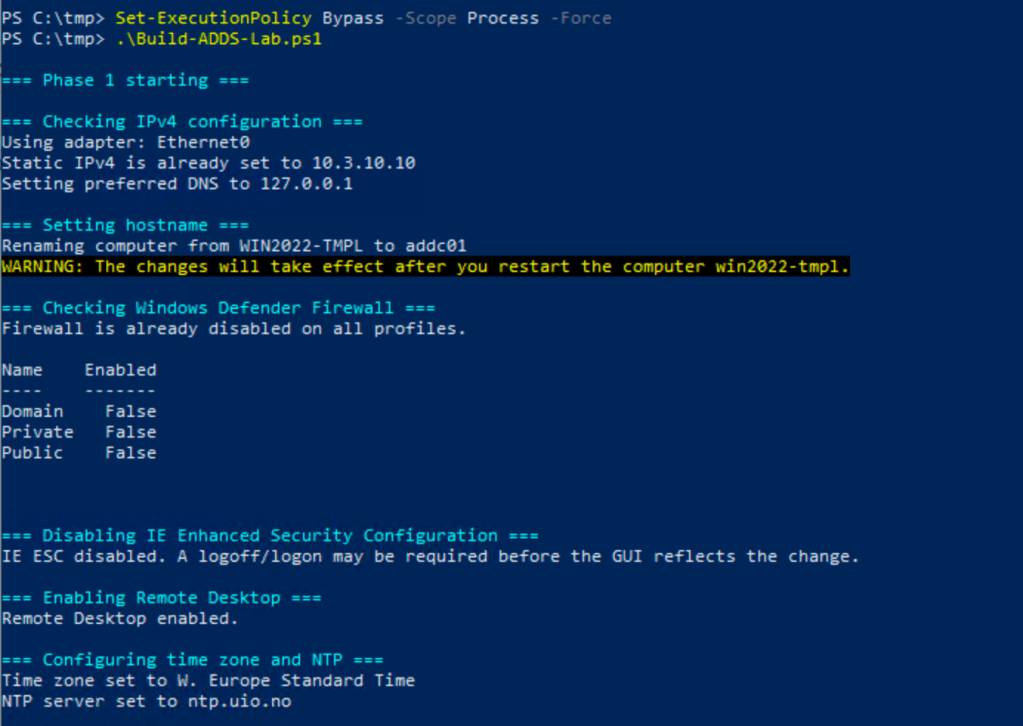
It renames, needs a reboot before it can continue. In my first version it failed with an error because of the renaming needs a boot, sso in that case, restart and restart the script, it will just continue.
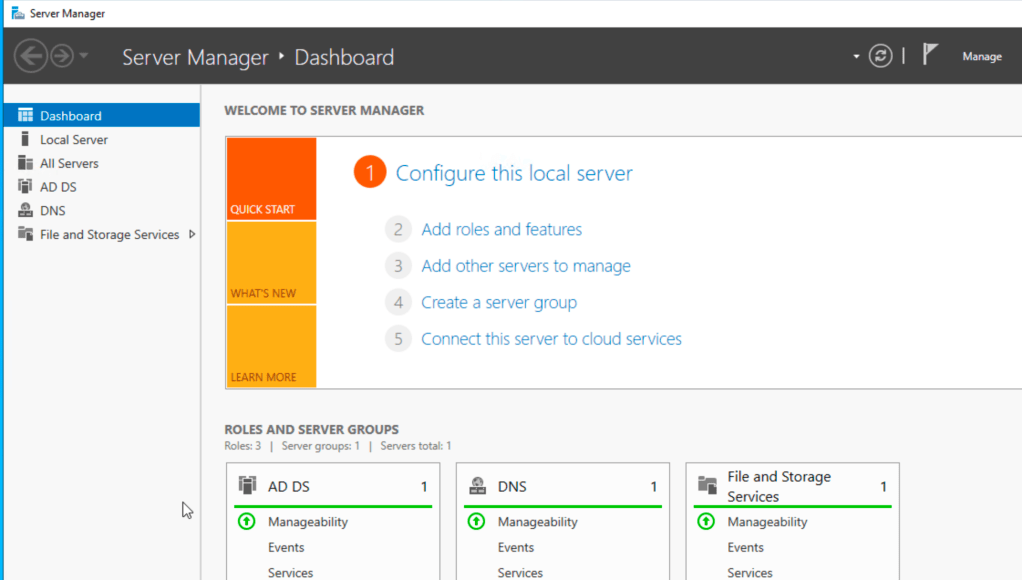
After a reboot you should have these service up and running.
My experience is that it failed to create the users in the script.
I ran this instead to add the users:
Import-Module ActiveDirectory$DomainName = "bervid.local"$BaseDN = "DC=bervid,DC=local"$UsersOU = "OU=Users,$BaseDN"$Password = ConvertTo-SecureString "VMware123!" -AsPlainText -Force$Users = @("bervid","user1","user2","user3")foreach ($u in $Users) { if (-not (Get-ADUser -Filter "SamAccountName -eq '$u'" -ErrorAction SilentlyContinue)) { New-ADUser ` -Name $u ` -SamAccountName $u ` -UserPrincipalName "$u@$DomainName" ` -Path $UsersOU ` -AccountPassword $Password ` -Enabled $true ` -PasswordNeverExpires $true Write-Host "Created user $u" } else { Write-Host "User $u already exists" }}Add-ADGroupMember -Identity "Domain Admins" -Members "bervid" -ErrorAction SilentlyContinueWrite-Host "Added bervid to Domain Admins"
Now we can focus on DC02. When we deploy this be sure to run the newsid / sysprep integrated in vCenter or manually on the vm to be sure:
C:\Windows\System32\Sysprep\Sysprep.exe , make sure to check oobe & generalize. IMPORTANT.
Then its the second script:
- configures the server with its static IP, gateway, DNS, timezone, NTP, RDP, and basic lab settings
- renames the server to addc02 if needed and reboots
- verifies DNS and connectivity to the existing DC (addc01)
- joins the existing bervid.local domain
- installs AD DS and DNS
- promotes the server to an additional domain controller
- reboots again
- updates DNS client settings so it uses itself and the first DC
- checks reverse DNS, A/PTR records, forwarders, and basic AD replication health
#requires -RunAsAdministrator<# Lab build script for the second AD/DNS server in pod 3 Stage 0: - Configure network - Disable firewall - Disable IE ESC - Enable RDP - Set time zone and NTP - Rename host if needed - Reboot immediately if rename was required Stage 1: - Validate DNS and domain controller reachability - Validate domain credentials - Join existing domain - Reboot Stage 2: - Install AD DS + DNS - Promote server to additional domain controller - Reboot Stage 3: - Configure DNS client order - Ensure reverse lookup zone exists - Ensure A/PTR record - Ensure DNS forwarders - Run final validation#>param( [ValidateSet("Stage0","Stage1","Stage2","Stage3")] [string]$Stage = "Stage0")$ErrorActionPreference = "Stop"# =========================# CONFIGURATION# =========================$ComputerName = "addc02"$DomainName = "bervid.local"$NetBIOSName = "BERVID"$ServerIPv4 = "xx.3.xx.11"$PrefixLength = 24$DefaultGateway = "xx.3.xx.1"# Before join/promotion, use existing DC as DNS$InitialPreferredDNS = @("xx.3.xx.10")# After promotion, prefer local DNS first, then DC01$PostPromotionDNS = @("xx.3.xx.11","10.3.10.10")$NtpServer = "ntp.uio.no"$ReverseNetworkId = "xx.3.xx.0/24"$ReverseZoneName = "xx.3.xx.in-addr.arpa"$ExistingDC = "addc01.bervid.local"$DomainAdminUser = "administrator"$DomainAdminPassword = "VMware123!"$SafeModePassword = "VMware123!"$DnsForwarders = @("10.0.0.1","1.1.1.1","8.8.8.8")$SiteName = "Default-First-Site-Name"$ScriptPath = $MyInvocation.MyCommand.Path$TranscriptPath = "C:\Build-ADDS-Lab-DC02-v2.log"$TaskStage1 = "Build-ADDS-Lab-DC02-v2-Stage1"$TaskStage2 = "Build-ADDS-Lab-DC02-v2-Stage2"$TaskStage3 = "Build-ADDS-Lab-DC02-v2-Stage3"Start-Transcript -Path $TranscriptPath -Append | Out-Nullif ($PSVersionTable.PSEdition -ne 'Desktop') { throw "This script must be run in Windows PowerShell 5.1 (powershell.exe), not PowerShell 7 (pwsh)."}function Write-Step { param([string]$Message) Write-Host "" Write-Host "=== $Message ===" -ForegroundColor Cyan}function Register-StartupTask { param( [Parameter(Mandatory=$true)][string]$TaskName, [Parameter(Mandatory=$true)][string]$NextStage ) $action = New-ScheduledTaskAction -Execute "PowerShell.exe" -Argument "-ExecutionPolicy Bypass -File `"$ScriptPath`" -Stage $NextStage" $trigger = New-ScheduledTaskTrigger -AtStartup $principal = New-ScheduledTaskPrincipal -UserId "SYSTEM" -LogonType ServiceAccount -RunLevel Highest $task = New-ScheduledTask -Action $action -Trigger $trigger -Principal $principal Register-ScheduledTask -TaskName $TaskName -InputObject $task -Force | Out-Null}function Remove-StartupTask { param([string]$TaskName) Unregister-ScheduledTask -TaskName $TaskName -Confirm:$false -ErrorAction SilentlyContinue}function Ensure-StaticIP { param( [string[]]$DnsServers ) Write-Step "Checking IPv4 configuration" $adapter = Get-NetAdapter | Where-Object Status -eq "Up" | Sort-Object ifIndex | Select-Object -First 1 if (-not $adapter) { throw "No active network adapter found." } Write-Host "Using adapter: $($adapter.Name)" $existing = Get-NetIPAddress -InterfaceIndex $adapter.ifIndex -AddressFamily IPv4 -ErrorAction SilentlyContinue | Where-Object { $_.IPAddress -ne "127.0.0.1" } if (-not $existing -or ($existing | Select-Object -First 1).IPAddress -ne $ServerIPv4) { Write-Host "Setting static IP $ServerIPv4/$PrefixLength and gateway $DefaultGateway" $existing | ForEach-Object { try { Remove-NetIPAddress -InterfaceIndex $adapter.ifIndex -IPAddress $_.IPAddress -Confirm:$false -ErrorAction Stop } catch {} } Get-NetRoute -InterfaceIndex $adapter.ifIndex -DestinationPrefix "0.0.0.0/0" -ErrorAction SilentlyContinue | Remove-NetRoute -Confirm:$false -ErrorAction SilentlyContinue New-NetIPAddress -InterfaceIndex $adapter.ifIndex -IPAddress $ServerIPv4 -PrefixLength $PrefixLength -DefaultGateway $DefaultGateway | Out-Null } else { Write-Host "Static IPv4 is already set to $ServerIPv4" } Write-Host "Setting DNS servers to: $($DnsServers -join ', ')" Set-DnsClientServerAddress -InterfaceIndex $adapter.ifIndex -ServerAddresses $DnsServers}function Disable-Firewall { Write-Step "Checking Windows Defender Firewall" $profiles = Get-NetFirewallProfile $enabledProfiles = $profiles | Where-Object Enabled -eq "True" if ($enabledProfiles) { Write-Host "Firewall is enabled on one or more profiles. Disabling it for lab usage." Set-NetFirewallProfile -Profile Domain,Private,Public -Enabled False } else { Write-Host "Firewall is already disabled on all profiles." } Get-NetFirewallProfile | Select-Object Name, Enabled | Format-Table -AutoSize}function Disable-IESecurity { Write-Step "Disabling IE Enhanced Security Configuration" $adminKey = "HKLM:\SOFTWARE\Microsoft\Active Setup\Installed Components\{A509B1A7-37EF-4B3F-8CFC-4F3A74704073}" $userKey = "HKLM:\SOFTWARE\Microsoft\Active Setup\Installed Components\{A509B1A8-37EF-4B3F-8CFC-4F3A74704073}" foreach ($key in @($adminKey, $userKey)) { if (Test-Path $key) { Set-ItemProperty -Path $key -Name "IsInstalled" -Value 0 -Type DWord } } Write-Host "IE ESC disabled. A logoff/logon may be required before the GUI reflects the change."}function Enable-RDP { Write-Step "Enabling Remote Desktop" Set-ItemProperty -Path "HKLM:\System\CurrentControlSet\Control\Terminal Server" -Name "fDenyTSConnections" -Value 0 Enable-NetFirewallRule -DisplayGroup "Remote Desktop" -ErrorAction SilentlyContinue | Out-Null Write-Host "Remote Desktop enabled."}function Set-TimeConfig { Write-Step "Configuring time zone and NTP" tzutil /s "W. Europe Standard Time" w32tm /config /manualpeerlist:$NtpServer /syncfromflags:manual /update | Out-Null Restart-Service w32time -Force Start-Sleep -Seconds 3 w32tm /resync /force | Out-Null Write-Host "Time zone set to W. Europe Standard Time" Write-Host "NTP server set to $NtpServer"}function Ensure-HostNameOrReboot { Write-Step "Setting hostname" $currentName = $env:COMPUTERNAME if ($currentName -ne $ComputerName) { Write-Host "Renaming computer from $currentName to $ComputerName" Rename-Computer -NewName $ComputerName -Force Write-Host "Hostname change requires a reboot before domain join." Write-Host "Registering startup task for Stage1 and rebooting now." Remove-StartupTask -TaskName $TaskStage1 Remove-StartupTask -TaskName $TaskStage2 Remove-StartupTask -TaskName $TaskStage3 Register-StartupTask -TaskName $TaskStage1 -NextStage "Stage1" Restart-Computer -Force exit } else { Write-Host "Hostname is already set to $ComputerName" }}function Wait-ForDNSAndDC { Write-Step "Waiting for DNS and existing domain controller" $max = 30 $count = 0 do { Start-Sleep -Seconds 10 $count++ $dnsOk = $false $dcOk = $false try { Resolve-DnsName $ExistingDC -ErrorAction Stop | Out-Null $dnsOk = $true } catch {} try { nltest /dsgetdc:$DomainName | Out-Null $dcOk = $true } catch {} } until (($dnsOk -and $dcOk) -or $count -ge $max) if (-not ($dnsOk -and $dcOk)) { throw "Could not verify DNS resolution and domain controller reachability for $DomainName" }}function New-DomainCredential { $user = "$DomainAdminUser@$DomainName" $securePwd = ConvertTo-SecureString $DomainAdminPassword -AsPlainText -Force return New-Object System.Management.Automation.PSCredential($user, $securePwd)}function Test-DomainCredential { param( [Parameter(Mandatory=$true)] [System.Management.Automation.PSCredential]$Credential ) Write-Step "Validating domain credentials" try { if (Get-PSDrive -Name "ADTEST" -ErrorAction SilentlyContinue) { Remove-PSDrive -Name "ADTEST" -ErrorAction SilentlyContinue } $null = New-PSDrive -Name "ADTEST" -PSProvider FileSystem -Root "\\$ExistingDC\SYSVOL" -Credential $Credential -ErrorAction Stop Remove-PSDrive -Name "ADTEST" -ErrorAction SilentlyContinue Write-Host "Domain credentials validated successfully." } catch { throw "Domain credential validation failed. Check username, password, and access to \\$ExistingDC\SYSVOL" }}function Join-DomainAndReboot { Write-Step "Joining existing domain" $currentComputerSystem = Get-CimInstance Win32_ComputerSystem if ($currentComputerSystem.PartOfDomain -and $currentComputerSystem.Domain -ieq $DomainName) { Write-Host "Server is already joined to domain $DomainName" return } $cred = New-DomainCredential Test-DomainCredential -Credential $cred Remove-StartupTask -TaskName $TaskStage2 Register-StartupTask -TaskName $TaskStage2 -NextStage "Stage2" Add-Computer -DomainName $DomainName -Credential $cred -Force Write-Host "Domain join completed. Rebooting now." Restart-Computer -Force exit}function Install-ADDSAndPromote { Write-Step "Installing AD DS and DNS" Import-Module ServerManager -ErrorAction Stop Install-WindowsFeature AD-Domain-Services, DNS -IncludeManagementTools Write-Step "Creating post-promotion startup task" Remove-StartupTask -TaskName $TaskStage3 Register-StartupTask -TaskName $TaskStage3 -NextStage "Stage3" Write-Step "Promoting server to additional domain controller" $cred = New-DomainCredential $smPwd = ConvertTo-SecureString $SafeModePassword -AsPlainText -Force Install-ADDSDomainController ` -DomainName $DomainName ` -Credential $cred ` -InstallDns ` -SafeModeAdministratorPassword $smPwd ` -SiteName $SiteName ` -Force ` -NoRebootOnCompletion:$false}function Wait-ForAD { Write-Step "Waiting for Active Directory services" $max = 30 $count = 0 do { Start-Sleep -Seconds 10 $count++ $adReady = Get-Service NTDS -ErrorAction SilentlyContinue } until (($adReady -and $adReady.Status -eq 'Running') -or $count -ge $max) if (-not $adReady -or $adReady.Status -ne 'Running') { throw "Active Directory services did not become ready in time." }}function Ensure-ReverseZone { Write-Step "Checking reverse lookup zone" Import-Module DnsServer $zone = Get-DnsServerZone -Name $ReverseZoneName -ErrorAction SilentlyContinue if (-not $zone) { Write-Host "Reverse zone $ReverseZoneName was not found locally. Creating it." Add-DnsServerPrimaryZone -NetworkId $ReverseNetworkId -ReplicationScope "Domain" } else { Write-Host "Reverse zone $ReverseZoneName already exists" }}function Ensure-DNSRecords { Write-Step "Ensuring A and PTR records" Import-Module DnsServer $aRecord = Get-DnsServerResourceRecord -ZoneName $DomainName -Name $ComputerName -RRType "A" -ErrorAction SilentlyContinue if (-not $aRecord) { Add-DnsServerResourceRecordA ` -ZoneName $DomainName ` -Name $ComputerName ` -IPv4Address $ServerIPv4 ` -CreatePtr ` -AllowUpdateAny Write-Host "Added A/PTR record for $ComputerName.$DomainName -> $ServerIPv4" } else { Write-Host "A record for $ComputerName.$DomainName already exists" }}function Set-DNSForwarders { Write-Step "Configuring DNS forwarders" Import-Module DnsServer $current = (Get-DnsServerForwarder -ErrorAction SilentlyContinue).IPAddress.IPAddressToString $wanted = $DnsForwarders if (-not $current -or (@($current) -join ",") -ne (@($wanted) -join ",")) { Set-DnsServerForwarder -IPAddress $wanted -UseRecurse $true Write-Host "DNS forwarders set to: $($wanted -join ', ')" } else { Write-Host "DNS forwarders are already configured correctly: $($current -join ', ')" }}function Set-PostPromotionDNSClient { Write-Step "Configuring post-promotion DNS client settings" $adapter = Get-NetAdapter | Where-Object Status -eq "Up" | Sort-Object ifIndex | Select-Object -First 1 if (-not $adapter) { throw "No active network adapter found." } Set-DnsClientServerAddress -InterfaceIndex $adapter.ifIndex -ServerAddresses $PostPromotionDNS Write-Host "DNS client servers updated to: $($PostPromotionDNS -join ', ')"}function Final-Checks { Write-Step "Final validation" Write-Host "Hostname:" $env:COMPUTERNAME Write-Host "Domain:" $env:USERDNSDOMAIN Get-NetIPAddress -AddressFamily IPv4 | Where-Object { $_.IPAddress -notlike "169.254*" -and $_.IPAddress -ne "127.0.0.1" } | Select-Object InterfaceAlias, IPAddress, PrefixLength | Format-Table -AutoSize Get-NetFirewallProfile | Select-Object Name, Enabled | Format-Table -AutoSize try { nltest /dsgetdc:$DomainName } catch {} try { Resolve-DnsName "$ComputerName.$DomainName" } catch {} try { Resolve-DnsName $ServerIPv4 } catch {} try { repadmin /replsummary } catch {} try { Get-DnsServerForwarder | Format-Table -AutoSize } catch {} Write-Host "Build complete."}switch ($Stage) { "Stage0" { Write-Step "Stage 0 starting" Ensure-StaticIP -DnsServers $InitialPreferredDNS Disable-Firewall Disable-IESecurity Enable-RDP Set-TimeConfig Ensure-HostNameOrReboot Write-Host "No rename reboot required. Continuing to Stage1 in the current run." Wait-ForDNSAndDC Join-DomainAndReboot } "Stage1" { Write-Step "Stage 1 starting" Remove-StartupTask -TaskName $TaskStage1 Ensure-StaticIP -DnsServers $InitialPreferredDNS Disable-Firewall Disable-IESecurity Enable-RDP Set-TimeConfig Wait-ForDNSAndDC Join-DomainAndReboot Write-Host "Server is already domain joined. Continuing to Stage2 in the current run." Install-ADDSAndPromote } "Stage2" { Write-Step "Stage 2 starting" Remove-StartupTask -TaskName $TaskStage2 Ensure-StaticIP -DnsServers $InitialPreferredDNS Disable-Firewall Disable-IESecurity Enable-RDP Set-TimeConfig Wait-ForDNSAndDC Install-ADDSAndPromote } "Stage3" { Write-Step "Stage 3 starting" Remove-StartupTask -TaskName $TaskStage3 Wait-ForAD Set-PostPromotionDNSClient Ensure-ReverseZone Ensure-DNSRecords Set-DNSForwarders Final-Checks }}Stop-Transcript | Out-Null
If all goes well you should now be up and running with 2 synced DC/AD/DNS servers for your lab.
The last thing was DNS records.
i was missing PTR record for my mgmt subnet, so i had to create that.
Add-DnsServerPrimaryZone -NetworkId "10.3.10.0/24" -ReplicationScope "Domain"
then i could run an import of all the different VCF services. I ran this on my addc01 server to easily prepare for the VCF install.
This creates a A record with PTR
Import-Module DnsServer$ZoneName = "lab.local"$ReverseZone = "10.168.192.in-addr.arpa"$Records = @( @{ Name = "mgmt01"; IP = "192.168.10.20" } @{ Name = "vc01"; IP = "192.168.10.21" } @{ Name = "host01"; IP = "192.168.10.22" } @{ Name = "host02"; IP = "192.168.10.23" } @{ Name = "host03"; IP = "192.168.10.24" } @{ Name = "host04"; IP = "192.168.10.25" } @{ Name = "host05"; IP = "192.168.10.26" } @{ Name = "host06"; IP = "192.168.10.27" } @{ Name = "host07"; IP = "192.168.10.28" } @{ Name = "host08"; IP = "192.168.10.29" } @{ Name = "ops01"; IP = "192.168.10.30" } @{ Name = "ops02"; IP = "192.168.10.31" } @{ Name = "ops03"; IP = "192.168.10.32" } @{ Name = "auto01"; IP = "192.168.10.33" } @{ Name = "log01"; IP = "192.168.10.34" } @{ Name = "net01"; IP = "192.168.10.35" } @{ Name = "repo01"; IP = "192.168.10.36" } @{ Name = "svc01"; IP = "192.168.10.37" } @{ Name = "idm01"; IP = "192.168.10.38" } @{ Name = "idm02"; IP = "192.168.10.39" } @{ Name = "idm03"; IP = "192.168.10.40" } @{ Name = "dns01"; IP = "192.168.10.41" } @{ Name = "dns02"; IP = "192.168.10.42" } @{ Name = "gw01"; IP = "192.168.10.43" } @{ Name = "gw02"; IP = "192.168.10.44" } @{ Name = "jump01"; IP = "192.168.10.45" } @{ Name = "backup01"; IP = "192.168.10.46" } @{ Name = "proxy01"; IP = "192.168.10.47" } @{ Name = "edge01"; IP = "192.168.10.48" } @{ Name = "edge02"; IP = "192.168.10.49" })foreach ($rec in $Records) { $existingA = Get-DnsServerResourceRecord -ZoneName $ZoneName -Name $rec.Name -RRType "A" -ErrorAction SilentlyContinue if (-not $existingA) { Add-DnsServerResourceRecordA ` -ZoneName $ZoneName ` -Name $rec.Name ` -IPv4Address $rec.IP Write-Host "Created A record: $($rec.Name).$ZoneName -> $($rec.IP)" } else { Write-Host "A record already exists: $($rec.Name).$ZoneName" }}foreach ($rec in $Records) { $lastOctet = ($rec.IP -split '\.')[-1] $fqdn = "$($rec.Name).$ZoneName" $existingPTR = Get-DnsServerResourceRecord -ZoneName $ReverseZone -Name $lastOctet -RRType "PTR" -ErrorAction SilentlyContinue if (-not $existingPTR) { Add-DnsServerResourceRecordPtr ` -ZoneName $ReverseZone ` -Name $lastOctet ` -PtrDomainName $fqdn Write-Host "Created PTR record: $($rec.IP) -> $fqdn" } else { Write-Host "PTR record already exists for: $($rec.IP)" }}Write-Host ""Write-Host "Verification:" -ForegroundColor Cyanforeach ($rec in $Records) { $fqdn = "$($rec.Name).$ZoneName" try { Resolve-DnsName $fqdn -ErrorAction Stop | Out-Null Write-Host "Resolved OK: $fqdn" } catch { Write-Host "Resolution failed: $fqdn" -ForegroundColor Yellow }}
Ok , now i`m ready for the next step, which is nested host-install.
 Bervid.net
Leave a comment