
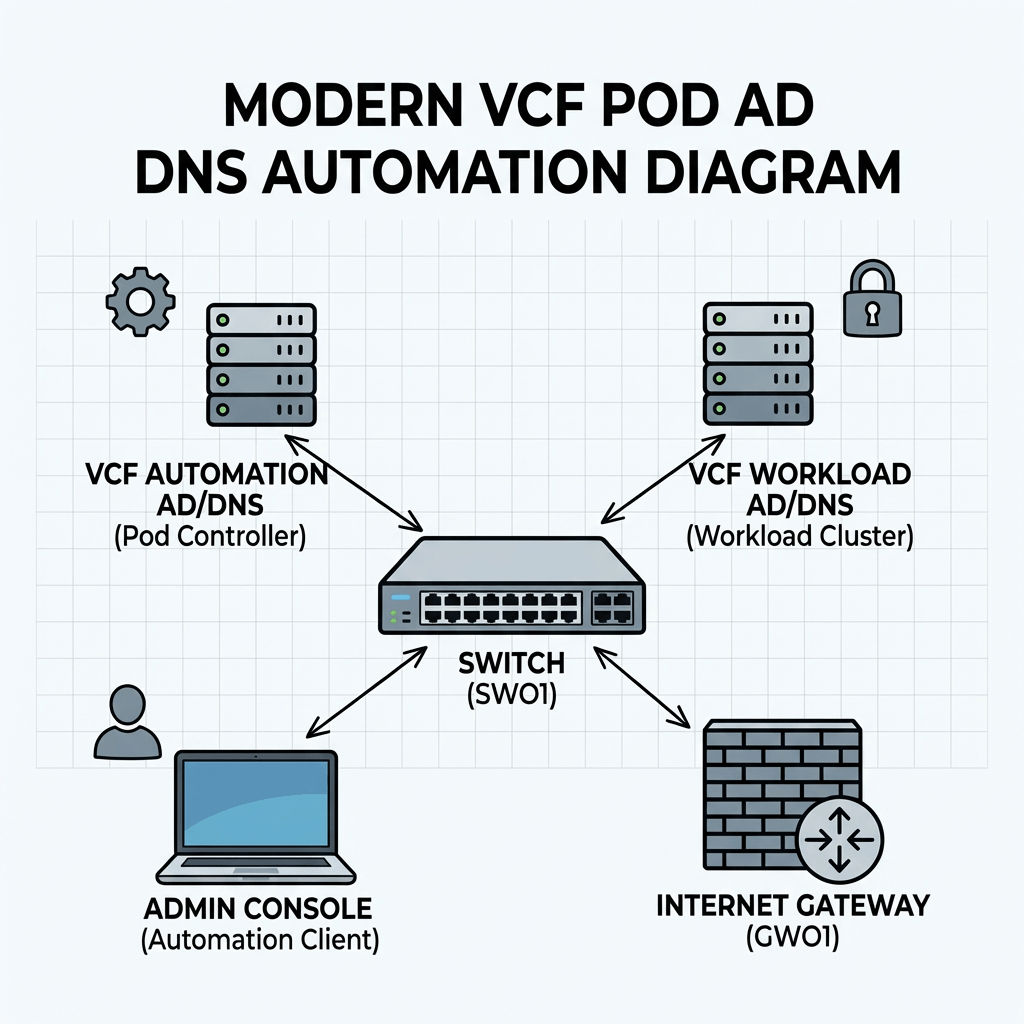
Objective: Creating a complete nested pod from scratch containing ad/dc/dns, tftp, ntp and a complete VCF installation.
- starting with automating the setup process in windows server in my new LAB.
- already configured an ipblock in my external fw based on /16, and created vlan and interface in the virtual fw for my mgmt network.
- already have a std windows 2022 server configured with static IP and a lokal admin.
Script functionality
The script automates the initial configuration of a Windows server that will function as an Active Directory domain controller and DNS server. It performs the following configuration steps:
- Configures the server hostname
- Verifies and disables Windows Defender Firewall
- Disables Internet Explorer Enhanced Security Configuration
- Enables Remote Desktop
- Sets the system timezone
- Configures time synchronization against a specified NTP source
- Installs the AD DS and DNS Server roles
- Creates a new Active Directory domain
- Creates an administrative account and adds it to the Domain Admins group
- Creates additional standard user accounts
- Creates a reverse DNS lookup zone for the target subnet
- Creates both forward (A) and reverse (PTR) DNS records for the domain controller
- Configures DNS forwarders
- Creates a baseline OU structure for administration and organization:
- Servers
- Users
- Service Accounts
Edit the configuration section to fit your needs.
#requires -RunAsAdministratorparam( [ValidateSet("Stage0","Stage1","Stage2")] [string]$Stage = "Stage0")$ErrorActionPreference = "Stop"$ComputerName = "addc01"$DomainName = "bervid.local"$NetBIOSName = "BERVID"$ServerIPv4 = "xx.3.xx.10"$PrefixLength = 24$DefaultGateway = "xx.3.xx.1"$PreferredDNS = "127.0.0.1"$NtpServer = "ntp.uio.no"$ReverseNetworkId = "xx.3.xx.0/24"$ReverseZoneName = "xx.3.xx.in-addr.arpa"$DefaultUserPwd = "VMware123!"$SafeModePassword = "VMware123!"$UsersToCreate = @("bervid","user1","user2","user3")$DnsForwarders = @("1.1.1.1","8.8.8.8")$ScriptPath = $MyInvocation.MyCommand.Path$TranscriptPath = "C:\Build-ADDS-Lab-DC01-v4.log"$TaskStage1 = "Build-ADDS-Lab-DC01-v4-Stage1"$TaskStage2 = "Build-ADDS-Lab-DC01-v4-Stage2"Start-Transcript -Path $TranscriptPath -Append | Out-Nullif ($PSVersionTable.PSEdition -ne 'Desktop') { throw "Run this in Windows PowerShell 5.1 (powershell.exe), not pwsh."}function Write-Step { param([string]$Message) Write-Host ""; Write-Host "=== $Message ===" -ForegroundColor Cyan }function Get-BaseDN { ($DomainName.Split(".") | ForEach-Object { "DC=$_" }) -join "," }function Register-StartupTask { param([string]$TaskName,[string]$NextStage) $action = New-ScheduledTaskAction -Execute "PowerShell.exe" -Argument "-ExecutionPolicy Bypass -File `"$ScriptPath`" -Stage $NextStage" $trigger = New-ScheduledTaskTrigger -AtStartup $principal = New-ScheduledTaskPrincipal -UserId "SYSTEM" -LogonType ServiceAccount -RunLevel Highest $task = New-ScheduledTask -Action $action -Trigger $trigger -Principal $principal Register-ScheduledTask -TaskName $TaskName -InputObject $task -Force | Out-Null}function Remove-StartupTask { param([string]$TaskName) Unregister-ScheduledTask -TaskName $TaskName -Confirm:$false -ErrorAction SilentlyContinue}function Ensure-StaticIP { Write-Step "Checking IPv4 configuration" $adapter = Get-NetAdapter | Where-Object Status -eq "Up" | Sort-Object ifIndex | Select-Object -First 1 if (-not $adapter) { throw "No active network adapter found." } $existing = Get-NetIPAddress -InterfaceIndex $adapter.ifIndex -AddressFamily IPv4 -ErrorAction SilentlyContinue | Where-Object { $_.IPAddress -ne "127.0.0.1" -and $_.IPAddress -notlike "169.254*" } if (-not $existing -or ($existing | Select-Object -First 1).IPAddress -ne $ServerIPv4) { $existing | ForEach-Object { try { Remove-NetIPAddress -InterfaceIndex $adapter.ifIndex -IPAddress $_.IPAddress -Confirm:$false -ErrorAction Stop } catch {} } Get-NetRoute -InterfaceIndex $adapter.ifIndex -DestinationPrefix "0.0.0.0/0" -ErrorAction SilentlyContinue | Remove-NetRoute -Confirm:$false -ErrorAction SilentlyContinue New-NetIPAddress -InterfaceIndex $adapter.ifIndex -IPAddress $ServerIPv4 -PrefixLength $PrefixLength -DefaultGateway $DefaultGateway | Out-Null } Set-DnsClientServerAddress -InterfaceIndex $adapter.ifIndex -ServerAddresses $PreferredDNS}function Disable-Firewall { Write-Step "Checking Windows Defender Firewall" if (Get-NetFirewallProfile | Where-Object Enabled -eq "True") { Set-NetFirewallProfile -Profile Domain,Private,Public -Enabled False } Get-NetFirewallProfile | Select-Object Name, Enabled | Format-Table -AutoSize}function Disable-IESecurity { Write-Step "Disabling IE Enhanced Security Configuration" $adminKey = "HKLM:\SOFTWARE\Microsoft\Active Setup\Installed Components\{A509B1A7-37EF-4B3F-8CFC-4F3A74704073}" $userKey = "HKLM:\SOFTWARE\Microsoft\Active Setup\Installed Components\{A509B1A8-37EF-4B3F-8CFC-4F3A74704073}" foreach ($key in @($adminKey, $userKey)) { if (Test-Path $key) { Set-ItemProperty -Path $key -Name "IsInstalled" -Value 0 -Type DWord } }}function Enable-RDP { Write-Step "Enabling Remote Desktop" Set-ItemProperty -Path "HKLM:\System\CurrentControlSet\Control\Terminal Server" -Name "fDenyTSConnections" -Value 0 Enable-NetFirewallRule -DisplayGroup "Remote Desktop" -ErrorAction SilentlyContinue | Out-Null}function Set-TimeConfig { Write-Step "Configuring time zone and NTP" tzutil /s "W. Europe Standard Time" w32tm /config /manualpeerlist:$NtpServer /syncfromflags:manual /reliable:yes /update | Out-Null Restart-Service w32time -Force Start-Sleep -Seconds 3 w32tm /resync /force | Out-Null}function Ensure-HostNameOrReboot { Write-Step "Setting hostname" if ($env:COMPUTERNAME -ne $ComputerName) { Rename-Computer -NewName $ComputerName -Force Remove-StartupTask -TaskName $TaskStage1 Remove-StartupTask -TaskName $TaskStage2 Register-StartupTask -TaskName $TaskStage1 -NextStage "Stage1" Restart-Computer -Force exit }}function Install-ADDSAndPromote { Write-Step "Installing AD DS and DNS" Import-Module ServerManager -ErrorAction Stop Install-WindowsFeature AD-Domain-Services, DNS -IncludeManagementTools Remove-StartupTask -TaskName $TaskStage2 Register-StartupTask -TaskName $TaskStage2 -NextStage "Stage2" Write-Step "Promoting server to new forest/domain" $smPwd = ConvertTo-SecureString $SafeModePassword -AsPlainText -Force Install-ADDSForest ` -DomainName $DomainName ` -DomainNetbiosName $NetBIOSName ` -InstallDNS ` -SafeModeAdministratorPassword $smPwd ` -Force ` -NoRebootOnCompletion:$false}function Wait-ForAD { Write-Step "Waiting for Active Directory services" $max = 30; $count = 0 do { Start-Sleep -Seconds 10 $count++ $adReady = Get-Service NTDS -ErrorAction SilentlyContinue } until (($adReady -and $adReady.Status -eq "Running") -or $count -ge $max) if (-not $adReady -or $adReady.Status -ne "Running") { throw "Active Directory services did not become ready in time." }}function Ensure-OU { param([string]$Name,[string]$Path) $ouDn = "OU=$Name,$Path" if (-not (Get-ADOrganizationalUnit -LDAPFilter "(distinguishedName=$ouDn)" -ErrorAction SilentlyContinue)) { New-ADOrganizationalUnit -Name $Name -Path $Path -ProtectedFromAccidentalDeletion $false }}function Create-OUStructure { Write-Step "Creating OU structure" Import-Module ActiveDirectory $baseDN = Get-BaseDN Ensure-OU -Name "Servers" -Path $baseDN Ensure-OU -Name "Users" -Path $baseDN Ensure-OU -Name "Service Accounts" -Path $baseDN}function Create-DomainUsers { Write-Step "Creating additional domain users" Import-Module ActiveDirectory $securePwd = ConvertTo-SecureString $DefaultUserPwd -AsPlainText -Force $usersOU = "OU=Users,$((Get-BaseDN))" foreach ($u in $UsersToCreate) { $existing = Get-ADUser -Filter "SamAccountName -eq '$u'" -ErrorAction SilentlyContinue if (-not $existing) { New-ADUser ` -Name $u ` -SamAccountName $u ` -UserPrincipalName "$u@$DomainName" ` -Path $usersOU ` -AccountPassword $securePwd ` -Enabled $true ` -PasswordNeverExpires $true } } Add-ADGroupMember -Identity "Domain Admins" -Members "bervid" -ErrorAction SilentlyContinue}function Ensure-ReverseZone { Write-Step "Ensuring reverse lookup zone" Import-Module DnsServer $zone = Get-DnsServerZone -Name $ReverseZoneName -ErrorAction SilentlyContinue if (-not $zone) { Add-DnsServerPrimaryZone -NetworkId $ReverseNetworkId -ReplicationScope "Domain" }}function Ensure-DNSRecords { Write-Step "Ensuring A and PTR records for addc01" Import-Module DnsServer $aRecord = Get-DnsServerResourceRecord -ZoneName $DomainName -Name $ComputerName -RRType "A" -ErrorAction SilentlyContinue if (-not $aRecord) { Add-DnsServerResourceRecordA -ZoneName $DomainName -Name $ComputerName -IPv4Address $ServerIPv4 } $lastOctet = ($ServerIPv4 -split '\.')[-1] $existingPTR = Get-DnsServerResourceRecord -ZoneName $ReverseZoneName -Name $lastOctet -RRType PTR -ErrorAction SilentlyContinue if (-not $existingPTR) { Add-DnsServerResourceRecordPtr -ZoneName $ReverseZoneName -Name $lastOctet -PtrDomainName "$ComputerName.$DomainName" }}function Set-DNSForwarders { Write-Step "Configuring DNS forwarders" Import-Module DnsServer $current = (Get-DnsServerForwarder -ErrorAction SilentlyContinue).IPAddress.IPAddressToString if ((@($current) -join ",") -ne (@($DnsForwarders) -join ",")) { Set-DnsServerForwarder -IPAddress $DnsForwarders -UseRecurse $true }}function Add-CheckResult { param([string]$Name,[bool]$Passed,[string]$Detail) [PSCustomObject]@{ Check=$Name; Status=$(if($Passed){"PASS"}else{"FAIL"}); Detail=$Detail }}function Final-Checks { Write-Step "Final validation summary" Import-Module ActiveDirectory Import-Module DnsServer $results = @() $baseDN = Get-BaseDN $results += Add-CheckResult "Hostname" ($env:COMPUTERNAME -eq $ComputerName) $env:COMPUTERNAME try { $domain = Get-ADDomain $results += Add-CheckResult "Domain created" ($domain.DNSRoot -eq $DomainName) $domain.DNSRoot } catch { $results += Add-CheckResult "Domain created" $false $_.Exception.Message } foreach ($ou in @("Servers","Users","Service Accounts")) { $ouDn = "OU=$ou,$baseDN" $exists = Get-ADOrganizationalUnit -LDAPFilter "(distinguishedName=$ouDn)" -ErrorAction SilentlyContinue $results += Add-CheckResult "OU $ou" ([bool]$exists) $ouDn } foreach ($u in $UsersToCreate) { $user = Get-ADUser -Filter "SamAccountName -eq '$u'" -ErrorAction SilentlyContinue $results += Add-CheckResult "User $u" ([bool]$user) $(if ($user) { $user.UserPrincipalName } else { "Missing" }) } $bervidDA = Get-ADGroupMember "Domain Admins" -ErrorAction SilentlyContinue | Where-Object { $_.SamAccountName -eq "bervid" } $results += Add-CheckResult "bervid in Domain Admins" ([bool]$bervidDA) $(if ($bervidDA) { "Member" } else { "Missing" }) $rev = Get-DnsServerZone -Name $ReverseZoneName -ErrorAction SilentlyContinue $results += Add-CheckResult "Reverse zone" ([bool]$rev) $ReverseZoneName $aRecord = Get-DnsServerResourceRecord -ZoneName $DomainName -Name $ComputerName -RRType "A" -ErrorAction SilentlyContinue $results += Add-CheckResult "A record addc01" ([bool]$aRecord) "$ComputerName.$DomainName" $lastOctet = ($ServerIPv4 -split '\.')[-1] $ptr = Get-DnsServerResourceRecord -ZoneName $ReverseZoneName -Name $lastOctet -RRType PTR -ErrorAction SilentlyContinue $results += Add-CheckResult "PTR record addc01" ([bool]$ptr) $ServerIPv4 $currentForwarders = (Get-DnsServerForwarder -ErrorAction SilentlyContinue).IPAddress.IPAddressToString $forwardersOk = ((@($currentForwarders) -join ",") -eq (@($DnsForwarders) -join ",")) $results += Add-CheckResult "DNS forwarders" $forwardersOk (@($currentForwarders) -join ", ") $results | Format-Table -AutoSize $failCount = @($results | Where-Object Status -eq "FAIL").Count if ($failCount -eq 0) { Write-Host "`nDC01 build summary: SUCCESS" -ForegroundColor Green } else { Write-Host "`nDC01 build summary: COMPLETED WITH ISSUES ($failCount failed checks)" -ForegroundColor Yellow }}switch ($Stage) { "Stage0" { Write-Step "Stage 0 starting" Ensure-StaticIP Disable-Firewall Disable-IESecurity Enable-RDP Set-TimeConfig Ensure-HostNameOrReboot Install-ADDSAndPromote } "Stage1" { Write-Step "Stage 1 starting" Remove-StartupTask -TaskName $TaskStage1 Ensure-StaticIP Disable-Firewall Disable-IESecurity Enable-RDP Set-TimeConfig Install-ADDSAndPromote } "Stage2" { Write-Step "Stage 2 starting" Remove-StartupTask -TaskName $TaskStage2 Wait-ForAD Create-OUStructure Create-DomainUsers Ensure-ReverseZone Ensure-DNSRecords Set-DNSForwarders Final-Checks }}Stop-Transcript | Out-Null
How to run:
Set-ExecutionPolicy Bypass -Scope Process -Force.\Build-ADDS-Lab-DC01-v4.ps1
Server will promote to DC and restart. After reboot phase 2 will continue via scheduled task.
To run it i thought the easiest would be to copy directly via RDP, but since my pod was behind a virtual pfsense i had to create a rule to allow MS RDP 3389 both in physical and virtual pfsense. Then i had powershell in RDP and copied what i needed.
RDP traffic flow example[Admin PC]192.168.50.25 | | TCP 3389 v[Edge Firewall]Route: 172.20.0.0/16 -> 192.168.50.13 | | forwarded toward pod firewall v[Pod Firewall - WAN]192.168.50.13 Rule needed here: Allow TCP 3389 Source: 192.168.50.0/24 Destination: 172.20.10.0/24 | | routed into pod management VLAN v[Pod Management Network]172.20.10.0/24VLAN 310 | v[Windows Server]dc01.example.local172.20.10.10RDP listening on TCP 3389
So lets run it:
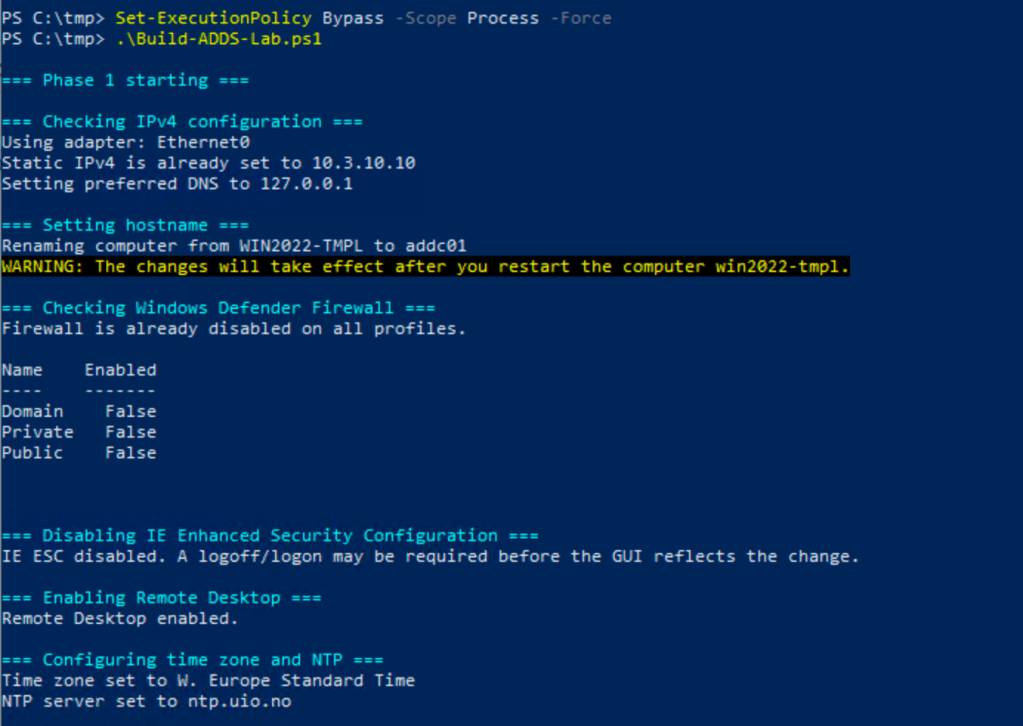
It renames, needs a reboot before it can continue. In my first version it failed with an error because of the renaming needs a boot, so in that case, restart and run the script, it will just continue.
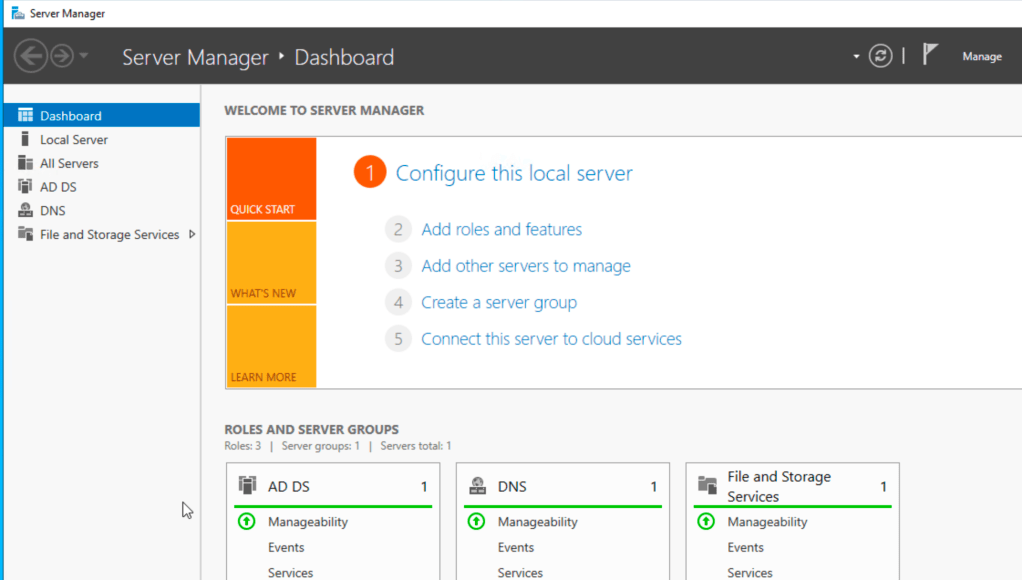
After a reboot you should have these services up and running.
You could run a pre-check script to make sure everything is done before you start with addc02:
run it:
Set-ExecutionPolicy Bypass -Scope Process -Force.\PreCheck-ADDS-Lab.ps1
#requires -RunAsAdministrator$ErrorActionPreference = "Stop"$DomainName = "bervid.local"$ComputerName = "addc01"$ServerIPv4 = "xx.3.xx.10"$ReverseZoneName = "xx.3.xx.in-addr.arpa"$ExpectedUsers = @("bervid","user1","user2","user3")function Write-Step { param([string]$Message) Write-Host "" Write-Host "=== $Message ===" -ForegroundColor Cyan}function Get-BaseDN { $parts = $DomainName.Split(".") ($parts | ForEach-Object { "DC=$_" }) -join ","}Import-Module ActiveDirectoryImport-Module DnsServer$baseDN = Get-BaseDNWrite-Step "Checking domain"Get-ADDomain | Select-Object DNSRoot, NetBIOSName | Format-Table -AutoSizeWrite-Step "Checking forward DNS"Resolve-DnsName "$ComputerName.$DomainName" | Format-Table -AutoSizeWrite-Step "Checking reverse DNS zone"$rev = Get-DnsServerZone -Name $ReverseZoneName -ErrorAction SilentlyContinueif ($rev) { Write-Host "Reverse zone exists: $ReverseZoneName"} else { Write-Warning "Reverse zone is missing: $ReverseZoneName"}Write-Step "Checking PTR for addc01"try { Resolve-DnsName $ServerIPv4 | Format-Table -AutoSize}catch { Write-Warning "PTR lookup failed for $ServerIPv4"}Write-Step "Checking OUs"$ous = @("Servers","Users","Service Accounts")foreach ($ou in $ous) { $ouDn = "OU=$ou,$baseDN" $exists = Get-ADOrganizationalUnit -LDAPFilter "(distinguishedName=$ouDn)" -ErrorAction SilentlyContinue if ($exists) { Write-Host "OU exists: $ouDn" } else { Write-Warning "OU missing: $ouDn" }}Write-Step "Checking users"foreach ($u in $ExpectedUsers) { $user = Get-ADUser -Filter "SamAccountName -eq '$u'" -ErrorAction SilentlyContinue if ($user) { Write-Host "User exists: $u" } else { Write-Warning "User missing: $u" }}Write-Step "Checking Domain Admins membership for bervid"$da = Get-ADGroupMember "Domain Admins" | Where-Object { $_.SamAccountName -eq "bervid" }if ($da) { Write-Host "bervid is a member of Domain Admins"} else { Write-Warning "bervid is NOT a member of Domain Admins"}
This should verify if everything is done as expected.
If you still want to add users manually:
Import-Module ActiveDirectory$DomainName = "bervid.local"$BaseDN = "DC=bervid,DC=local"$UsersOU = "OU=Users,$BaseDN"$Password = ConvertTo-SecureString "VMware123!" -AsPlainText -Force$Users = @("bervid","user1","user2","user3")foreach ($u in $Users) { if (-not (Get-ADUser -Filter "SamAccountName -eq '$u'" -ErrorAction SilentlyContinue)) { New-ADUser ` -Name $u ` -SamAccountName $u ` -UserPrincipalName "$u@$DomainName" ` -Path $UsersOU ` -AccountPassword $Password ` -Enabled $true ` -PasswordNeverExpires $true Write-Host "Created user $u" } else { Write-Host "User $u already exists" }}Add-ADGroupMember -Identity "Domain Admins" -Members "bervid" -ErrorAction SilentlyContinueWrite-Host "Added bervid to Domain Admins"
Now we can focus on DC02. When we deploy this be sure to run the newsid / sysprep integrated in vCenter or manually on the vm to be sure:
C:\Windows\System32\Sysprep\Sysprep.exe , make sure to check oobe & generalize. IMPORTANT.
Then its the second script:
- configures the server with its static IP, gateway, DNS, timezone, NTP, RDP, and basic lab settings
- renames the server to addc02 if needed and reboots
- verifies DNS and connectivity to the existing DC (addc01)
- joins the existing bervid.local domain
- installs AD DS and DNS
- promotes the server to an additional domain controller
- reboots again
- updates DNS client settings so it uses itself and the first DC
- checks reverse DNS, A/PTR records, forwarders, and basic AD replication health
run it:
Set-ExecutionPolicy Bypass -Scope Process -Force.\Build-ADDS-Lab-DC02-v3.ps1
#requires -RunAsAdministratorparam( [ValidateSet("Stage0","Stage1","Stage2","Stage3")] [string]$Stage = "Stage0")$ErrorActionPreference = "Stop"$ComputerName = "addc02"$DomainName = "bervid.local"$NetBIOSName = "BERVID"$ServerIPv4 = "xx.3.xx.11"$PrefixLength = 24$DefaultGateway = "xx.3.xx.1"$InitialPreferredDNS = @("xx.3.xx.10")$PostPromotionDNS = @("xx.3.xx.11","xx.3.xx.10")$NtpServer = "ntp.uio.no"$ReverseNetworkId = "xx.3.xx.0/24"$ReverseZoneName = "xx.3.xx.in-addr.arpa"$ExistingDC = "addc01.bervid.local"$DomainAdminUser = "Administrator"$DomainAdminPassword = "VMware123!"$SafeModePassword = "VMware123!"$DnsForwarders = @("1.1.1.1","8.8.8.8")$SiteName = "Default-First-Site-Name"$ScriptPath = $MyInvocation.MyCommand.Path$TranscriptPath = "C:\Build-ADDS-Lab-DC02-v3.log"$TaskStage1 = "Build-ADDS-Lab-DC02-v3-Stage1"$TaskStage2 = "Build-ADDS-Lab-DC02-v3-Stage2"$TaskStage3 = "Build-ADDS-Lab-DC02-v3-Stage3"Start-Transcript -Path $TranscriptPath -Append | Out-Nullif ($PSVersionTable.PSEdition -ne 'Desktop') { throw "Run this in Windows PowerShell 5.1 (powershell.exe), not pwsh."}function Write-Step { param([string]$Message) Write-Host ""; Write-Host "=== $Message ===" -ForegroundColor Cyan }function Register-StartupTask { param([string]$TaskName,[string]$NextStage) $action = New-ScheduledTaskAction -Execute "PowerShell.exe" -Argument "-ExecutionPolicy Bypass -File `"$ScriptPath`" -Stage $NextStage" $trigger = New-ScheduledTaskTrigger -AtStartup $principal = New-ScheduledTaskPrincipal -UserId "SYSTEM" -LogonType ServiceAccount -RunLevel Highest $task = New-ScheduledTask -Action $action -Trigger $trigger -Principal $principal Register-ScheduledTask -TaskName $TaskName -InputObject $task -Force | Out-Null}function Remove-StartupTask { param([string]$TaskName) Unregister-ScheduledTask -TaskName $TaskName -Confirm:$false -ErrorAction SilentlyContinue}function Ensure-StaticIP { param([string[]]$DnsServers) Write-Step "Checking IPv4 configuration" $adapter = Get-NetAdapter | Where-Object Status -eq "Up" | Sort-Object ifIndex | Select-Object -First 1 if (-not $adapter) { throw "No active network adapter found." } $existing = Get-NetIPAddress -InterfaceIndex $adapter.ifIndex -AddressFamily IPv4 -ErrorAction SilentlyContinue | Where-Object { $_.IPAddress -ne "127.0.0.1" -and $_.IPAddress -notlike "169.254*" } if (-not $existing -or ($existing | Select-Object -First 1).IPAddress -ne $ServerIPv4) { $existing | ForEach-Object { try { Remove-NetIPAddress -InterfaceIndex $adapter.ifIndex -IPAddress $_.IPAddress -Confirm:$false -ErrorAction Stop } catch {} } Get-NetRoute -InterfaceIndex $adapter.ifIndex -DestinationPrefix "0.0.0.0/0" -ErrorAction SilentlyContinue | Remove-NetRoute -Confirm:$false -ErrorAction SilentlyContinue New-NetIPAddress -InterfaceIndex $adapter.ifIndex -IPAddress $ServerIPv4 -PrefixLength $PrefixLength -DefaultGateway $DefaultGateway | Out-Null } Set-DnsClientServerAddress -InterfaceIndex $adapter.ifIndex -ServerAddresses $DnsServers}function Disable-Firewall { Write-Step "Checking Windows Defender Firewall" if (Get-NetFirewallProfile | Where-Object Enabled -eq "True") { Set-NetFirewallProfile -Profile Domain,Private,Public -Enabled False }}function Disable-IESecurity { Write-Step "Disabling IE Enhanced Security Configuration" $adminKey = "HKLM:\SOFTWARE\Microsoft\Active Setup\Installed Components\{A509B1A7-37EF-4B3F-8CFC-4F3A74704073}" $userKey = "HKLM:\SOFTWARE\Microsoft\Active Setup\Installed Components\{A509B1A8-37EF-4B3F-8CFC-4F3A74704073}" foreach ($key in @($adminKey, $userKey)) { if (Test-Path $key) { Set-ItemProperty -Path $key -Name "IsInstalled" -Value 0 -Type DWord } }}function Enable-RDP { Write-Step "Enabling Remote Desktop" Set-ItemProperty -Path "HKLM:\System\CurrentControlSet\Control\Terminal Server" -Name "fDenyTSConnections" -Value 0 Enable-NetFirewallRule -DisplayGroup "Remote Desktop" -ErrorAction SilentlyContinue | Out-Null}function Set-TimeConfig { Write-Step "Configuring time zone and NTP" tzutil /s "W. Europe Standard Time" w32tm /config /manualpeerlist:$NtpServer /syncfromflags:manual /update | Out-Null Restart-Service w32time -Force Start-Sleep -Seconds 3 w32tm /resync /force | Out-Null}function Ensure-HostNameOrReboot { Write-Step "Setting hostname" if ($env:COMPUTERNAME -ne $ComputerName) { Rename-Computer -NewName $ComputerName -Force Remove-StartupTask -TaskName $TaskStage1 Remove-StartupTask -TaskName $TaskStage2 Remove-StartupTask -TaskName $TaskStage3 Register-StartupTask -TaskName $TaskStage1 -NextStage "Stage1" Restart-Computer -Force exit }}function Wait-ForDNSAndDC { Write-Step "Waiting for DNS and existing domain controller" $max = 30; $count = 0 do { Start-Sleep -Seconds 10 $count++ $dnsOk = $false $dcOk = $false try { Resolve-DnsName $ExistingDC -ErrorAction Stop | Out-Null; $dnsOk = $true } catch {} try { nltest /dsgetdc:$DomainName | Out-Null; $dcOk = $true } catch {} } until (($dnsOk -and $dcOk) -or $count -ge $max) if (-not ($dnsOk -and $dcOk)) { throw "Could not verify DNS and DC reachability for $DomainName" }}function New-DomainCredential { $user = "$DomainAdminUser@$DomainName" $securePwd = ConvertTo-SecureString $DomainAdminPassword -AsPlainText -Force New-Object System.Management.Automation.PSCredential($user, $securePwd)}function Test-DomainCredential { param([System.Management.Automation.PSCredential]$Credential) Write-Step "Validating domain credentials" try { if (Get-PSDrive -Name "ADTEST" -ErrorAction SilentlyContinue) { Remove-PSDrive -Name "ADTEST" -ErrorAction SilentlyContinue } $null = New-PSDrive -Name "ADTEST" -PSProvider FileSystem -Root "\\$ExistingDC\SYSVOL" -Credential $Credential -ErrorAction Stop Remove-PSDrive -Name "ADTEST" -ErrorAction SilentlyContinue } catch { throw "Domain credential validation failed against \\$ExistingDC\SYSVOL" }}function Join-DomainAndReboot { Write-Step "Joining existing domain" $currentComputerSystem = Get-CimInstance Win32_ComputerSystem if ($currentComputerSystem.PartOfDomain -and $currentComputerSystem.Domain -ieq $DomainName) { Write-Host "Server is already joined to $DomainName" return } $cred = New-DomainCredential Test-DomainCredential -Credential $cred Remove-StartupTask -TaskName $TaskStage2 Register-StartupTask -TaskName $TaskStage2 -NextStage "Stage2" Add-Computer -DomainName $DomainName -Credential $cred -Force Restart-Computer -Force exit}function Install-ADDSAndPromote { Write-Step "Installing AD DS and DNS" Import-Module ServerManager -ErrorAction Stop Install-WindowsFeature AD-Domain-Services, DNS -IncludeManagementTools Remove-StartupTask -TaskName $TaskStage3 Register-StartupTask -TaskName $TaskStage3 -NextStage "Stage3" Write-Step "Promoting server to additional domain controller" $cred = New-DomainCredential $smPwd = ConvertTo-SecureString $SafeModePassword -AsPlainText -Force Install-ADDSDomainController ` -DomainName $DomainName ` -Credential $cred ` -InstallDns ` -SafeModeAdministratorPassword $smPwd ` -SiteName $SiteName ` -Force ` -NoRebootOnCompletion:$false}function Wait-ForAD { Write-Step "Waiting for Active Directory services" $max = 30; $count = 0 do { Start-Sleep -Seconds 10 $count++ $adReady = Get-Service NTDS -ErrorAction SilentlyContinue } until (($adReady -and $adReady.Status -eq 'Running') -or $count -ge $max) if (-not $adReady -or $adReady.Status -ne 'Running') { throw "Active Directory services did not become ready in time." }}function Ensure-ReverseZone { Write-Step "Checking reverse lookup zone" Import-Module DnsServer $zone = Get-DnsServerZone -Name $ReverseZoneName -ErrorAction SilentlyContinue if (-not $zone) { Add-DnsServerPrimaryZone -NetworkId $ReverseNetworkId -ReplicationScope "Domain" }}function Ensure-DNSRecords { Write-Step "Ensuring A and PTR records for addc02" Import-Module DnsServer $aRecord = Get-DnsServerResourceRecord -ZoneName $DomainName -Name $ComputerName -RRType "A" -ErrorAction SilentlyContinue if (-not $aRecord) { Add-DnsServerResourceRecordA -ZoneName $DomainName -Name $ComputerName -IPv4Address $ServerIPv4 } $lastOctet = ($ServerIPv4 -split '\.')[-1] $existingPTR = Get-DnsServerResourceRecord -ZoneName $ReverseZoneName -Name $lastOctet -RRType PTR -ErrorAction SilentlyContinue if (-not $existingPTR) { Add-DnsServerResourceRecordPtr -ZoneName $ReverseZoneName -Name $lastOctet -PtrDomainName "$ComputerName.$DomainName" }}function Set-DNSForwarders { Write-Step "Configuring DNS forwarders" Import-Module DnsServer $current = (Get-DnsServerForwarder -ErrorAction SilentlyContinue).IPAddress.IPAddressToString if ((@($current) -join ",") -ne (@($DnsForwarders) -join ",")) { Set-DnsServerForwarder -IPAddress $DnsForwarders -UseRecurse $true }}function Set-PostPromotionDNSClient { Write-Step "Configuring post-promotion DNS client settings" $adapter = Get-NetAdapter | Where-Object Status -eq "Up" | Sort-Object ifIndex | Select-Object -First 1 if (-not $adapter) { throw "No active network adapter found." } Set-DnsClientServerAddress -InterfaceIndex $adapter.ifIndex -ServerAddresses $PostPromotionDNS}function Add-CheckResult { param([string]$Name,[bool]$Passed,[string]$Detail) [PSCustomObject]@{ Check=$Name; Status=$(if($Passed){"PASS"}else{"FAIL"}); Detail=$Detail }}function Final-Checks { Write-Step "Final validation summary" Import-Module ActiveDirectory Import-Module DnsServer $results = @() $results += Add-CheckResult "Hostname" ($env:COMPUTERNAME -eq $ComputerName) $env:COMPUTERNAME try { $domain = Get-ADDomain $results += Add-CheckResult "Domain reachable" ($domain.DNSRoot -eq $DomainName) $domain.DNSRoot } catch { $results += Add-CheckResult "Domain reachable" $false $_.Exception.Message } $dcJoined = (Get-CimInstance Win32_ComputerSystem).PartOfDomain $results += Add-CheckResult "Domain joined" $dcJoined $((Get-CimInstance Win32_ComputerSystem).Domain) $aRecord = Get-DnsServerResourceRecord -ZoneName $DomainName -Name $ComputerName -RRType "A" -ErrorAction SilentlyContinue $results += Add-CheckResult "A record addc02" ([bool]$aRecord) "$ComputerName.$DomainName" $rev = Get-DnsServerZone -Name $ReverseZoneName -ErrorAction SilentlyContinue $results += Add-CheckResult "Reverse zone" ([bool]$rev) $ReverseZoneName $lastOctet = ($ServerIPv4 -split '\.')[-1] $ptr = Get-DnsServerResourceRecord -ZoneName $ReverseZoneName -Name $lastOctet -RRType PTR -ErrorAction SilentlyContinue $results += Add-CheckResult "PTR record addc02" ([bool]$ptr) $ServerIPv4 try { $repl = repadmin /replsummary 2>&1 | Out-String $results += Add-CheckResult "Replication summary ran" $true "repadmin /replsummary completed" } catch { $results += Add-CheckResult "Replication summary ran" $false $_.Exception.Message } $currentForwarders = (Get-DnsServerForwarder -ErrorAction SilentlyContinue).IPAddress.IPAddressToString $forwardersOk = ((@($currentForwarders) -join ",") -eq (@($DnsForwarders) -join ",")) $results += Add-CheckResult "DNS forwarders" $forwardersOk (@($currentForwarders) -join ", ") $results | Format-Table -AutoSize $failCount = @($results | Where-Object Status -eq "FAIL").Count if ($failCount -eq 0) { Write-Host "`nDC02 build summary: SUCCESS" -ForegroundColor Green } else { Write-Host "`nDC02 build summary: COMPLETED WITH ISSUES ($failCount failed checks)" -ForegroundColor Yellow }}switch ($Stage) { "Stage0" { Write-Step "Stage 0 starting" Ensure-StaticIP -DnsServers $InitialPreferredDNS Disable-Firewall Disable-IESecurity Enable-RDP Set-TimeConfig Ensure-HostNameOrReboot Wait-ForDNSAndDC Join-DomainAndReboot } "Stage1" { Write-Step "Stage 1 starting" Remove-StartupTask -TaskName $TaskStage1 Ensure-StaticIP -DnsServers $InitialPreferredDNS Disable-Firewall Disable-IESecurity Enable-RDP Set-TimeConfig Wait-ForDNSAndDC Join-DomainAndReboot Install-ADDSAndPromote } "Stage2" { Write-Step "Stage 2 starting" Remove-StartupTask -TaskName $TaskStage2 Ensure-StaticIP -DnsServers $InitialPreferredDNS Disable-Firewall Disable-IESecurity Enable-RDP Set-TimeConfig Wait-ForDNSAndDC Install-ADDSAndPromote } "Stage3" { Write-Step "Stage 3 starting" Remove-StartupTask -TaskName $TaskStage3 Wait-ForAD Set-PostPromotionDNSClient Ensure-ReverseZone Ensure-DNSRecords Set-DNSForwarders Final-Checks }}Stop-Transcript | Out-Null
If all goes well you should now be up and running with 2 synced DC/AD/DNS servers for your lab.
The last thing was DNS records.
i was missing PTR record for my mgmt subnet, so i had to create that.
Add-DnsServerPrimaryZone -NetworkId "10.3.10.0/24" -ReplicationScope "Domain"
then i could run an import of all the different VCF services. I ran this on my addc01 server to easily prepare for the VCF install.
This creates an A record with PTR
Import-Module DnsServer$ZoneName = "lab.local"$ReverseZone = "10.168.192.in-addr.arpa"$Records = @( @{ Name = "mgmt01"; IP = "192.168.10.20" } @{ Name = "vc01"; IP = "192.168.10.21" } @{ Name = "host01"; IP = "192.168.10.22" } @{ Name = "host02"; IP = "192.168.10.23" } @{ Name = "host03"; IP = "192.168.10.24" } @{ Name = "host04"; IP = "192.168.10.25" } @{ Name = "host05"; IP = "192.168.10.26" } @{ Name = "host06"; IP = "192.168.10.27" } @{ Name = "host07"; IP = "192.168.10.28" } @{ Name = "host08"; IP = "192.168.10.29" } @{ Name = "ops01"; IP = "192.168.10.30" } @{ Name = "ops02"; IP = "192.168.10.31" } @{ Name = "ops03"; IP = "192.168.10.32" } @{ Name = "auto01"; IP = "192.168.10.33" } @{ Name = "log01"; IP = "192.168.10.34" } @{ Name = "net01"; IP = "192.168.10.35" } @{ Name = "repo01"; IP = "192.168.10.36" } @{ Name = "svc01"; IP = "192.168.10.37" } @{ Name = "idm01"; IP = "192.168.10.38" } @{ Name = "idm02"; IP = "192.168.10.39" } @{ Name = "idm03"; IP = "192.168.10.40" } @{ Name = "dns01"; IP = "192.168.10.41" } @{ Name = "dns02"; IP = "192.168.10.42" } @{ Name = "gw01"; IP = "192.168.10.43" } @{ Name = "gw02"; IP = "192.168.10.44" } @{ Name = "jump01"; IP = "192.168.10.45" } @{ Name = "backup01"; IP = "192.168.10.46" } @{ Name = "proxy01"; IP = "192.168.10.47" } @{ Name = "edge01"; IP = "192.168.10.48" } @{ Name = "edge02"; IP = "192.168.10.49" })foreach ($rec in $Records) { $existingA = Get-DnsServerResourceRecord -ZoneName $ZoneName -Name $rec.Name -RRType "A" -ErrorAction SilentlyContinue if (-not $existingA) { Add-DnsServerResourceRecordA ` -ZoneName $ZoneName ` -Name $rec.Name ` -IPv4Address $rec.IP Write-Host "Created A record: $($rec.Name).$ZoneName -> $($rec.IP)" } else { Write-Host "A record already exists: $($rec.Name).$ZoneName" }}foreach ($rec in $Records) { $lastOctet = ($rec.IP -split '\.')[-1] $fqdn = "$($rec.Name).$ZoneName" $existingPTR = Get-DnsServerResourceRecord -ZoneName $ReverseZone -Name $lastOctet -RRType "PTR" -ErrorAction SilentlyContinue if (-not $existingPTR) { Add-DnsServerResourceRecordPtr ` -ZoneName $ReverseZone ` -Name $lastOctet ` -PtrDomainName $fqdn Write-Host "Created PTR record: $($rec.IP) -> $fqdn" } else { Write-Host "PTR record already exists for: $($rec.IP)" }}Write-Host ""Write-Host "Verification:" -ForegroundColor Cyanforeach ($rec in $Records) { $fqdn = "$($rec.Name).$ZoneName" try { Resolve-DnsName $fqdn -ErrorAction Stop | Out-Null Write-Host "Resolved OK: $fqdn" } catch { Write-Host "Resolution failed: $fqdn" -ForegroundColor Yellow }}
Ok , now we are ready for the next step, which is nested host-install.
 Bervid.net
Leave a comment